React introduced the Hooks API in February 2019. Hooks are now widely used, but are you using them correctly? This article explains the basics of the Hooks API and the points to watch out for when using it.
What is useState?
Hooks were added in React 16.8. The following component creates a counter that increases a number when a button is clicked. The number is managed with a React state variable.
import React, { useState } from "react";

export const CounterComponent = () => {
  // Add state
  const [count, setCount] = useState(0);
  return (
    <div>
      <p>{count}</p>
      {/* Function that increments count on click */}
      <button
        onClick={() => {
          setCount(count + 1);
        }}
      >
        Click
      </button>
    </div>
  );
};
The useState() function in the code above is a Hook. This function declares a React state variable.
useState() returns an array containing the state value and a function for updating that state. The variable names are up to you, but the update function is often named in the form setSomething. You can pass any value as the initial state, including a number, string, or object.
Resetting state with the key attribute
React lets you add a key attribute to a component. You can use this key attribute to reset the state inside a component.
In the following example, the parent component has a state value named version. By passing version to the child component’s key attribute, the state inside the child component is reset when version is updated.
// Parent component
export const ParentComponent = () => {
  // Store the version
  const [version, setVersion] = useState(0);

  return (
    <>
      {/* Pass version to the key attribute of ChildComponent. When version updates, ChildComponent's state is reset. */}
      <ChildComponent key={version} />
      <button onClick={() => setVersion(version + 1)}>Reset version</button>
    </>
  );
};

// Child component
const ChildComponent = () => {
  // This state is reset
  const [name, setName] = useState("Hana");
  return (
    <div>
      <input
        type="text"
        value={name}
        onChange={(e) => setName(e.target.value)}
      />
      <p>Hi, {name}!</p>
    </div>
  );
};
Clicking the “Reset version” button shows that the value entered in the input is reset.
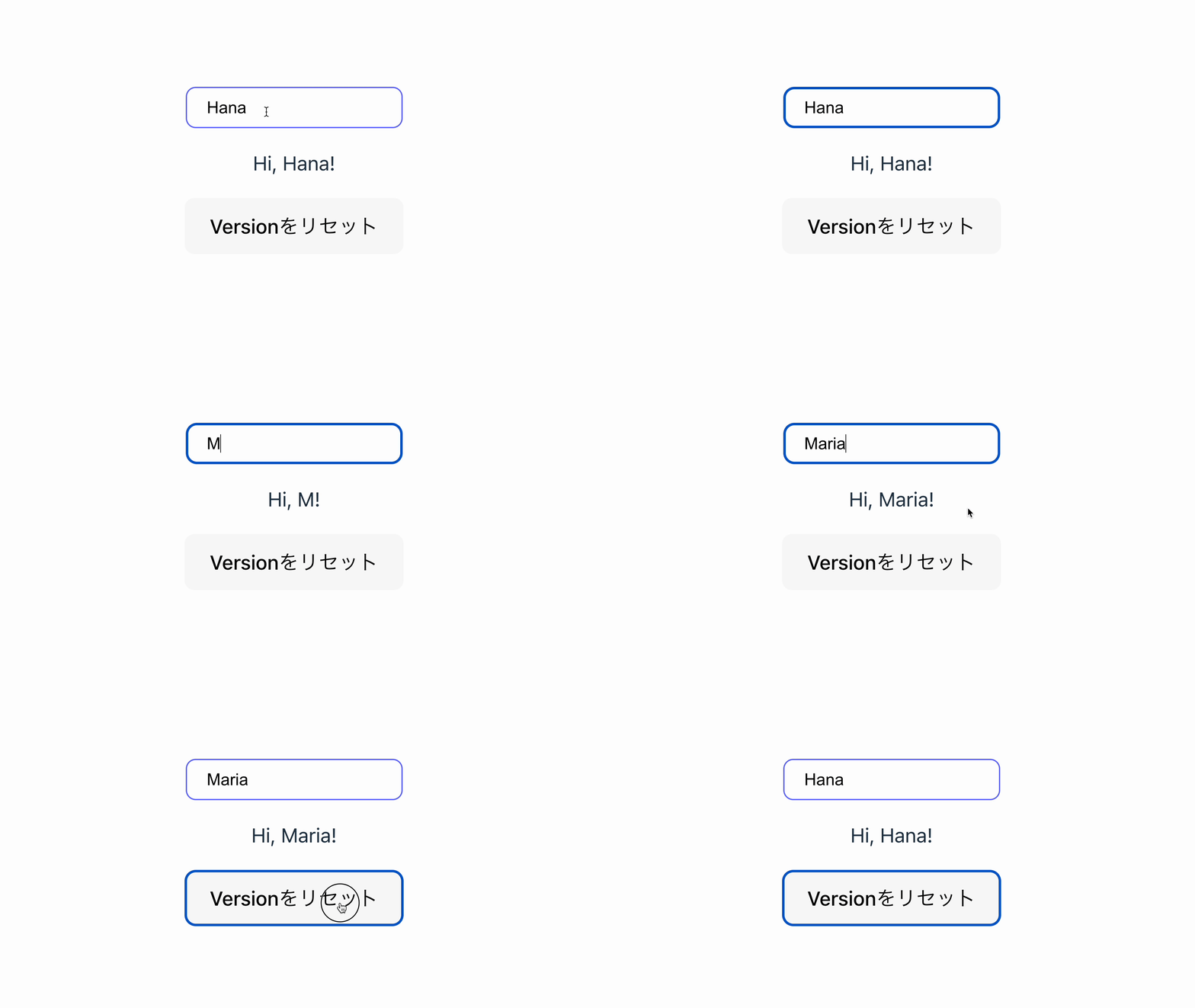
The React documentation presents this feature as a way to solve a common problem where state remains when it should be reset. See Resetting all state when a prop changes for details.
What is useEffect?
useEffect is used to synchronize a component with an external system. Examples include timers such as setInterval() and events such as window.addEventListener().
Pass the function you want to run as the first argument to useEffect. You can pass a dependency array as the second argument. That function runs once after the initial render and again whenever a value in the array changes. If you omit the second argument, the function runs after every render is committed.
Controlling when useEffect runs with the second argument
If you pass an empty array as the second argument to useEffect, it runs when the component mounts. If you return a cleanup function, that function runs when the component unmounts.
Example: Run console.log() when the component mounts
import React, { useEffect } from "react";
export const AlwaysMountComponent = () => {
  // Call console.log() when the component mounts.
  useEffect(() => {
    console.log("useEffect: The component mounted");
  }, []);

  return <div>You can pass an empty array as the second argument to useEffect</div>;
};
Note: In development builds with Strict Mode in React 18 and later, the useEffect setup runs one extra time on the initial mount. The cleanup function also runs if one exists. If this behavior is hard to follow while learning, disabling React Strict Mode can make it easier to understand.
Cleanup in useEffect
useEffect can return a function. The returned function is called a cleanup function. It runs before the next Effect when a value in the dependency array changes, and it also runs when the component unmounts. The following code shows a component that uses setInterval() to increase a number every second. When the component is destroyed, it calls clearInterval() to stop the timer.
import React, { useState, useEffect } from "react";

export const UseEffectComponent = () => {
  const [isView, setIsView] = useState(true);
  const handleToggleView = () => {
    setIsView(!isView);
  };
  return (
    <div>
      <div className="box">{isView && <CountComponent />}</div>
      <button className="button" onClick={handleToggleView}>
        Toggle number display
      </button>
    </div>
  );
};

const CountComponent = () => {
  const [count, setCount] = useState(0);
  useEffect(() => {
    const countUp = setInterval(() => {
      setCount((count) => count + 1);
      console.log("The count increased by 1");
    }, 1000);
    // Specify the return value.
    // Here, the timer is stopped when the component unmounts.
    return () => {
      console.log("The component unmounted");
      clearInterval(countUp);
    };
  }, []);
  return <p className="num">{count}</p>;
};
When you press the “Toggle number display” button and hide CountComponent, you can confirm that the timer has been stopped.
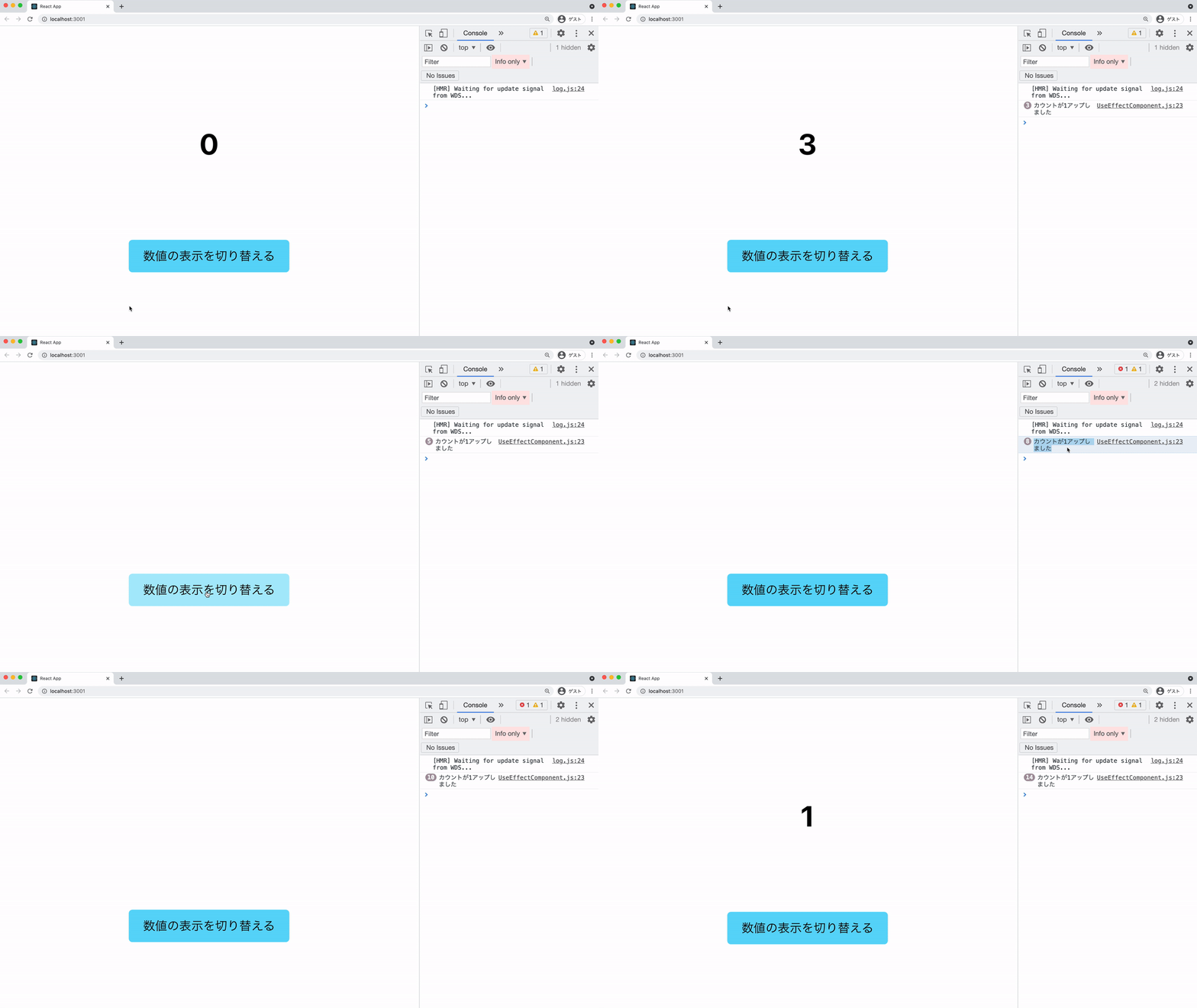
If clearInterval() is not called in the cleanup function, the internal setInterval() process keeps running even after the element is hidden. This can affect performance.
Do not keep updating dependent state inside useEffect
The following code looks fine at first glance. However, it creates an infinite loop because the state specified in the dependency array is updated every time inside useEffect.
import React, { useEffect, useState } from "react";

export const Counter = () => {
  const [count, setCount] = useState(0);
  // useEffect is called every time count changes
  useEffect(() => {
    setCount(count + 1);
  }, [count]);
  return <div>{count}</div>;
};
In this case, the console shows the following warning:
Warning: Maximum update depth exceeded. This can happen when a component calls setState inside useEffect, but useEffect either doesn’t have a dependency array, or one of the dependencies changes on every render.
In a useEffect dependency array, specify every reactive value referenced inside the code. In this case, count is reactive and is referenced inside useEffect(), so it must be included in the dependency array.
When a dependent value (count) is updated, useEffect is called. Then count is updated every time the useEffect function runs. As a result, the component falls into the following infinite loop:
- Run the
useEffectlogic - Update the
countvalue - Run
useEffectagain becausecountwas updated
To update once based on the previous state value inside useEffect, as in this example, use an updater function. By writing something like setCount((count) => count + 1), the updater function receives the previous value and updates state based on it. This lets you remove count itself from the dependency array.
import React, { useEffect, useState } from "react";

export const Counter = () => {
  const [count, setCount] = useState(0);
  useEffect(() => {
    // Pass an updater function to setCount
    setCount((count) => count + 1);
  }, []); // count can be removed from the dependency array, so the infinite loop is eliminated
  return <div>{count}</div>;
};
What is useCallback?
Memoization is an optimization that reuses a previous calculation result or value for the same input. In React, memo, useMemo, and useCallback can reuse references to values and functions.
useCallback is a Hook that returns the same callback function reference until a value in the dependency array changes. If a new function reference is created every time a component updates, a memoized child component may still re-render. Used for the right purpose, useCallback can reduce unnecessary re-renders.
To avoid re-renders, the child component also needs to be memoized. React memoization can be applied not only to callback functions but also to components. Wrapping the entire component in the memo() function memoizes that component. The following code wraps ChildComponent.js with memo().
import React, { memo, useState, useCallback } from "react";

// Wrap with memo
const ChildComponent = memo(({ name, handleClick }) => {
  console.log(`Child component "${name}" re-rendered`);
  return <button onClick={handleClick}>Add 1 to {name}</button>;
});

/**
 * A component that displays numbers.
 * It has buttons in child components that increment those numbers when clicked.
 */
// Counter component (parent)
export const UseCallbackComponent = () => {
  // Prepare two state values
  const [count1, setCount1] = useState(0);
  const [count2, setCount2] = useState(0);

  // Setter function for count1
  // Wrap the function with useCallback and include count1, which is used inside the function, in the dependency array.
  const handleClick1 = useCallback(() => {
    setCount1(count1 + 1);
  }, [count1]);

  // Setter function for count2
  // Wrap the function with useCallback and include count2, which is used inside the function, in the dependency array.
  const handleClick2 = useCallback(() => {
    setCount2(count2 + 1);
  }, [count2]);

  // Render the child components
  return (
    <div>
      <div>
        {count1} , {count2}
      </div>
      <div className="buttonGroup">
        <ChildComponent name="Counter 1" handleClick={handleClick1} />
        <ChildComponent name="Counter 2" handleClick={handleClick2} />
      </div>
    </div>
  );
};
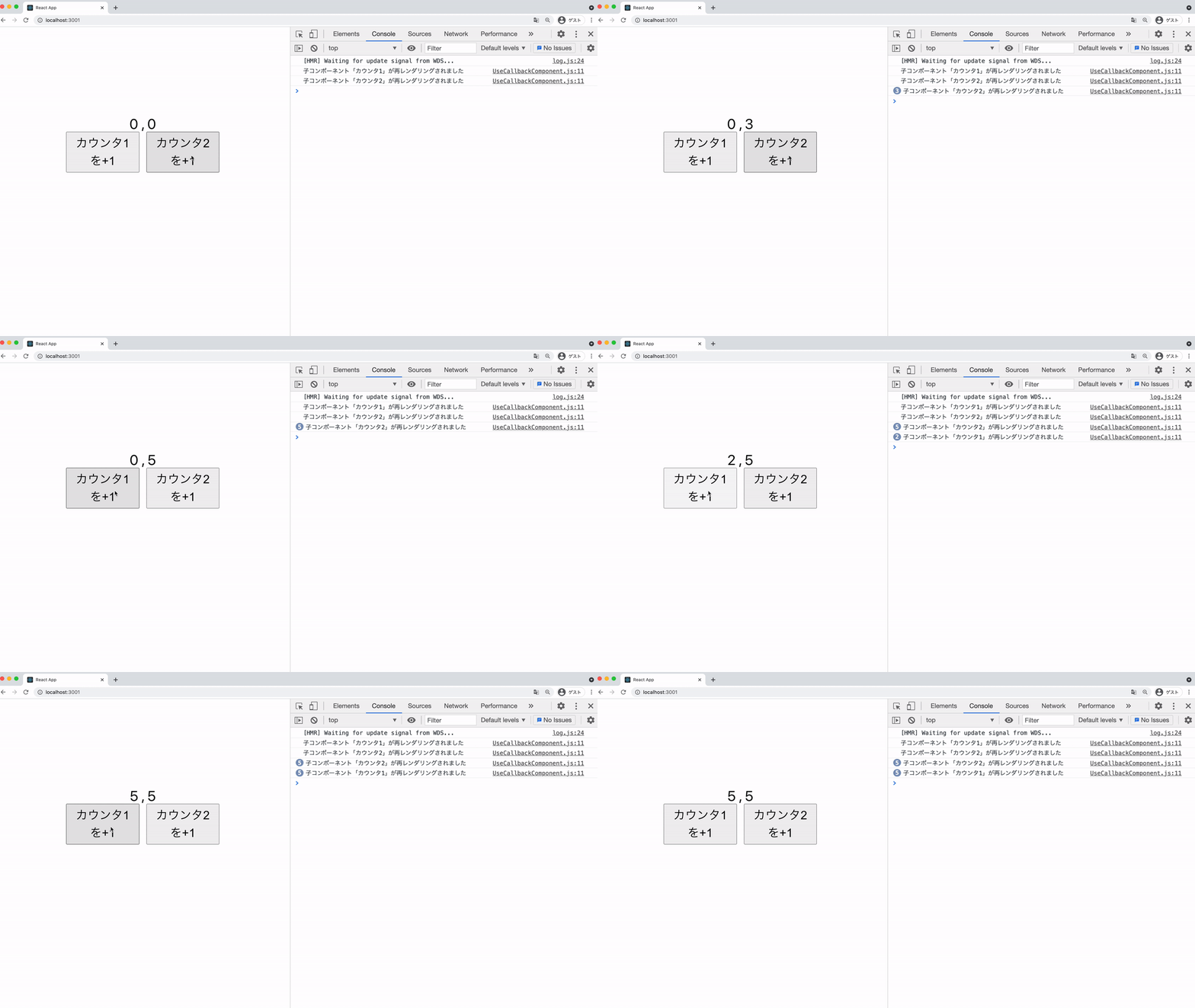
When you run the code above and press each button, you can see that only the corresponding component’s console.log() runs.
Referencing DOM elements with useRef
useRef can create a reference to an element in a React component. It can be used in a way similar to document.querySelector in JavaScript DOM operations. It is often used when React needs to hold a reference to a DOM element. When useRef is used as a reference to a DOM element, the reference is assigned when the component mounts and becomes null when the component unmounts. Therefore, define null as the initial value of useRef to represent the value before mounting.
import React, { useRef } from "react";
export const StateComponent = () => {
  // Create a reference to the h1 element.
  // Use null as the initial value for the unmounted state.
  const refContainer = useRef(null);
  return <h1 ref={refContainer}>Check the reference</h1>;
};
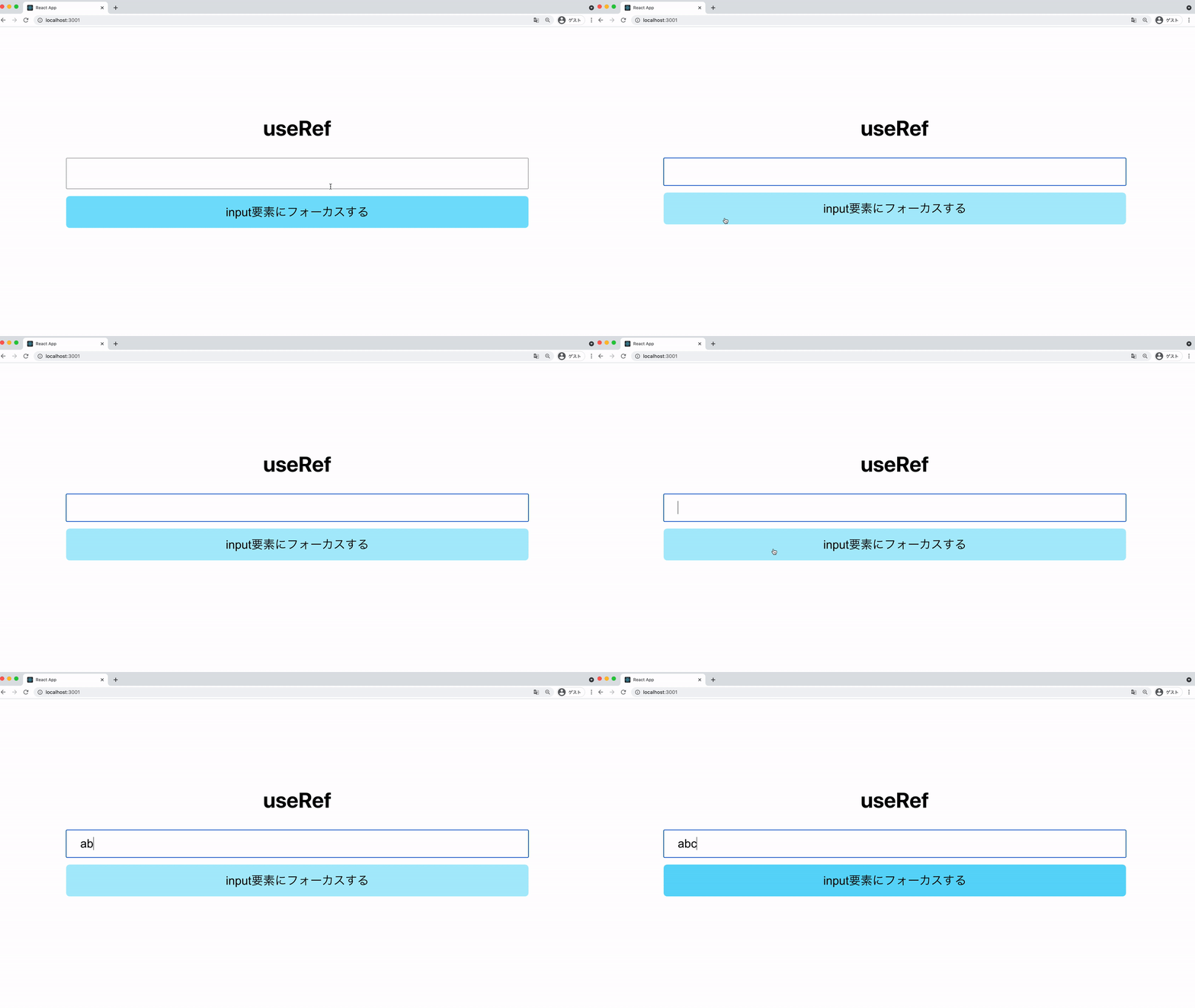
Add the ref attribute to the React component element you want to reference. You can check the referenced value with the current property. The following code focuses an input element when a button is clicked.
Example: Code that focuses an input element
import React, { useRef } from "react";

export const UseRefComponent = () => {
  const inputEl = useRef(null);
  const handleClick = () => {
    // Reference the current element
    inputEl.current.focus();
  };
  return (
    <div>
      <input className="input" ref={inputEl} type="text" />
      <button className="button" onClick={handleClick}>
        Focus the input element
      </button>
    </div>
  );
};
Keeping arbitrary values with useRef
useRef can hold arbitrary values, not only references to JSX elements. The current property created by useRef is a general-purpose container. It is mutable and can hold any kind of value.
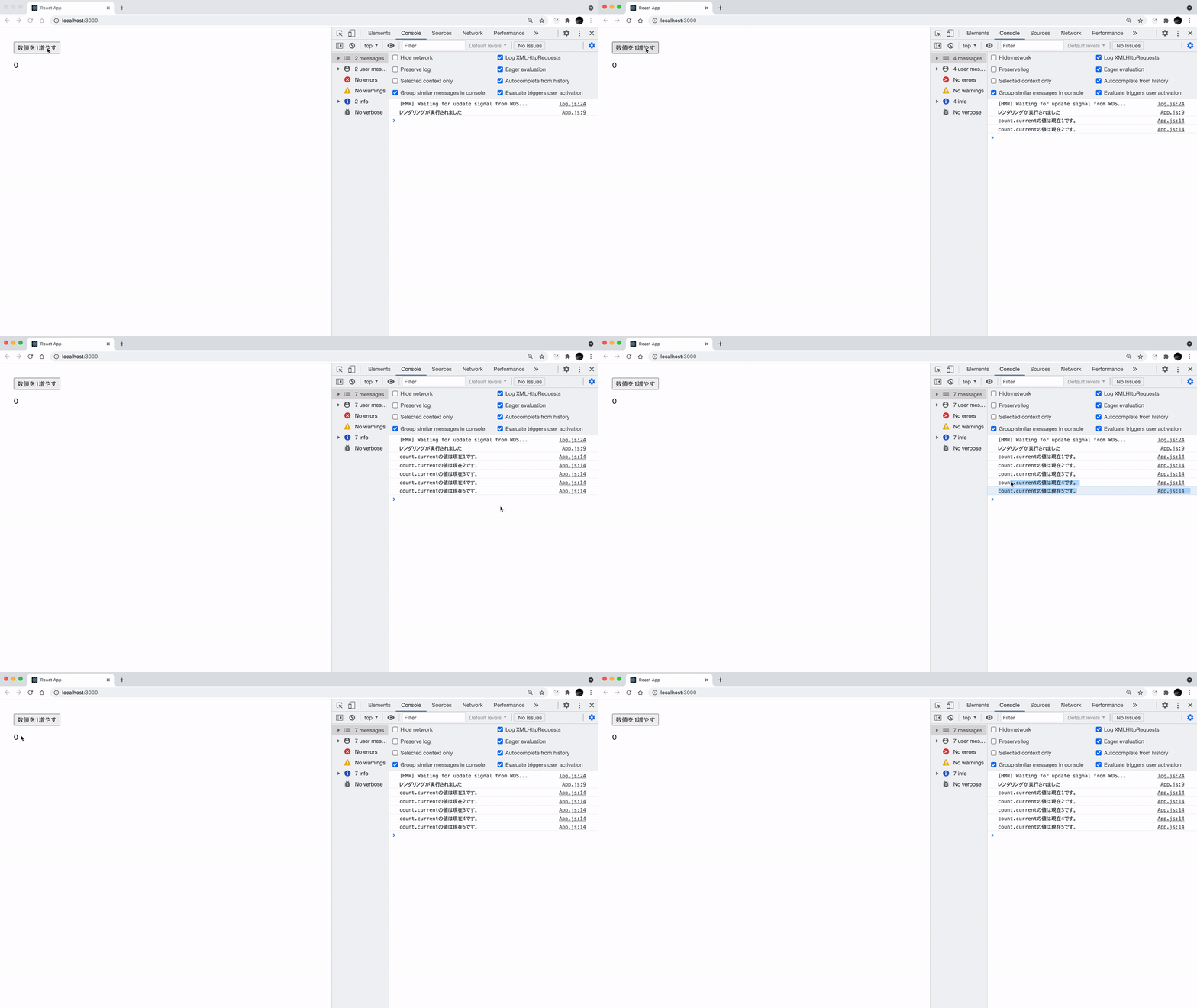
Unlike useState, a value held by useRef has the characteristic that changing it does not re-render the component. Use it when you want to change a component value but do not want to re-render. When you run the following code, you can see that even though the internal value changes, the displayed value in the <p> element does not change.
import React, { useEffect, useRef } from "react";

const UseRefValueComponent = () => {
  // Store an arbitrary value in useRef
  const count = useRef(0);
  useEffect(() => {
    // Run console.log() in useEffect when rendering occurs
    console.log("Rendering occurred");
  });
  // Event that increments the number defined with useRef
  const handleAddCount = () => {
    count.current += 1;
    console.log(`count.current is now ${count.current}.`);
  };
  return (
    <>
      <button onClick={handleAddCount}>Increase the number by 1</button>
      {/* Display the current value of useRef */}
      <p>{count.current}</p>
    </>
  );
};
Updated with useState, but not re-rendering?
This section explains some points to watch out for when using Hooks.
State is almost essential for managing the state of React components. useState is a convenient Hook that lets you use state in function components. However, useState has an important caveat. For example, suppose you implement the following TODO list.
import React, { useCallback, useState } from "react";

/**
 * A component that creates a TODO list.
 */
export const TodoList = () => {
  const [lists, setLists] = useState([]);
  const [value, setValue] = useState("");

  // Event handler that adds one item to the TODO list array when the button is clicked
  const handleClick = useCallback(() => {
    const id = lists.length;
    // Mutate the array destructively with the push method
    lists.push({ id, text: value });
    setLists(lists);
  }, [lists, value]);

  // Event handler that sets the input value to value
  const handleChange = useCallback(
    (e) => {
      setValue(e.target.value);
    },
    [setValue]
  );
  return (
    <div>
      <h1>TODO LIST</h1>
      <button onClick={handleClick}>Add task</button>
      <input value={value} onChange={handleChange} />
      {lists.map((list) => (
        <div key={list.id}>
          {list.text}
        </div>
      ))}
    </div>
  );
};
useState compares the existing state with the new value passed to the state update function, and updates it when there is a difference. However, the screen is not redrawn if you pass the same array back. This happens when you modify the current state array with a destructive method such as splice() or push().
Instead of directly changing the array that represents the current state, create a new array and pass it to the useState update function. Then the component will update correctly.
  // Event handler that adds one item to the TODO list array when the button is clicked
  const handleClick = useCallback(() => {
    const id = lists.length;
    // Create a new array and pass it to the update function
    const newList = [...lists, { id, text: value }];
    setLists(newList);
    setValue("");
  }, [lists, value]);
Should you use useLayoutEffect?
React provides two similar Hooks: useEffect and useLayoutEffect. How should they be used differently?
useLayoutEffect can be used in almost the same way as useEffect, but it has one major difference. It runs the callback function before the browser repaints the screen. It also processes any state updates scheduled there before repainting. Because useEffect usually runs after the screen has been painted, this matters for DOM measurements. If you adjust display position from those measurements, the uncorrected position can briefly appear.
Unfortunately, this has a downside. Blocking screen repainting means it takes longer for drawing to complete. As a result, the page can feel slower to the user, which harms the user experience. Unless DOM measurement or reflection must happen before painting, it is generally safer to use useEffect.
The official documentation also recommends using useEffect when possible.
Also, if your project uses server-side rendering, Effects do not run on the server. Because useLayoutEffect cannot obtain layout information on the server, design it with the assumption that it will run after hydration on the client.
useLayoutEffect is useful for tooltips and similar UI. It helps when you need to measure DOM size or position and reflect the result before it becomes visible to the user.
The difference between useMemo and useCallback
useMemo receives a calculation function as its first argument, while useCallback receives the function you want to cache as its first argument. Both receive a dependency array as their second argument.
useMemo performs memoization by storing the result of a calculation in a variable. It runs the calculation once on the first render. It then returns the cached value as long as the dependent values passed as the second argument do not change. In contrast, useCallback stores the reference to the callback function passed as its first argument. useCallback itself does not stop re-renders. However, it can stabilize a function reference passed to a memoized child component or similar consumer.
Use useMemo to reuse expensive calculation results. Use useCallback when you want to stabilize a function reference for a memoized child component or as a dependency of another Hook. If you are only using it as an event handler within the same component, be aware that it has almost no effect.
// Limited effect: used directly without passing it to a memoized component
const Component = () => {
  const handleClick = useCallback(() => { ... }, []);
  return (
    <button onClick={handleClick}>Click!</button>
  );
};

// OK: passed to a memoized component
const Component = () => {
  const handleClick = useCallback(() => { ... }, []);
  return (
    <ChildButtonComponent handleClick={handleClick} />
  );
};

const ChildButtonComponent = React.memo(({ handleClick }) => {
  return (
    <button onClick={handleClick}>Click!</button>
  );
});
Automatic optimization with React Compiler
React Compiler automatically optimizes components and values. It reduces the cases where manual memoization with useMemo, useCallback, and React.memo is needed. By introducing it, you can reduce unnecessary recalculation and re-rendering. You can also cut down on code written only for memoization and dependency array management.
At the same time, React Compiler is a build-time mechanism. Projects that have not adopted it will still have cases where useMemo or useCallback is needed. For React Compiler to optimize safely, follow the Rules of Hooks and keep components pure.
Rules of Hooks
React’s rule is that Hooks called in components must always be called in the same order and the same number of times. It forbids code where the order or number of Hook calls changes depending on the situation. Therefore, you cannot write code that says, “Do not run this Hook in this case.”
Example: This kind of code is not allowed
import React, { useState } from "react";

export const StateComponent = ({ enabled }) => {
  const [value, setValue] = useState("");

  if (enabled) {
    const [value2, setValue2] = useState("foo");
  }
  // ...omitted...
};
When you need to branch logic depending on the situation, call the Hook itself at the top level, then branch the logic afterward.
The surprisingly useful useDebugValue
As its name suggests, useDebugValue is a Hook for debugging. As React development progresses, it is common to create custom Hooks by combining the basic Hooks. useDebugValue can display debugging information for custom Hooks in the React Developer Tools browser extension. useDebugValue detects which custom Hook it was called from and displays the specified debugging information next to that custom Hook.
In the React extension, it appears as shown in the image below.
Example: View in developer tools
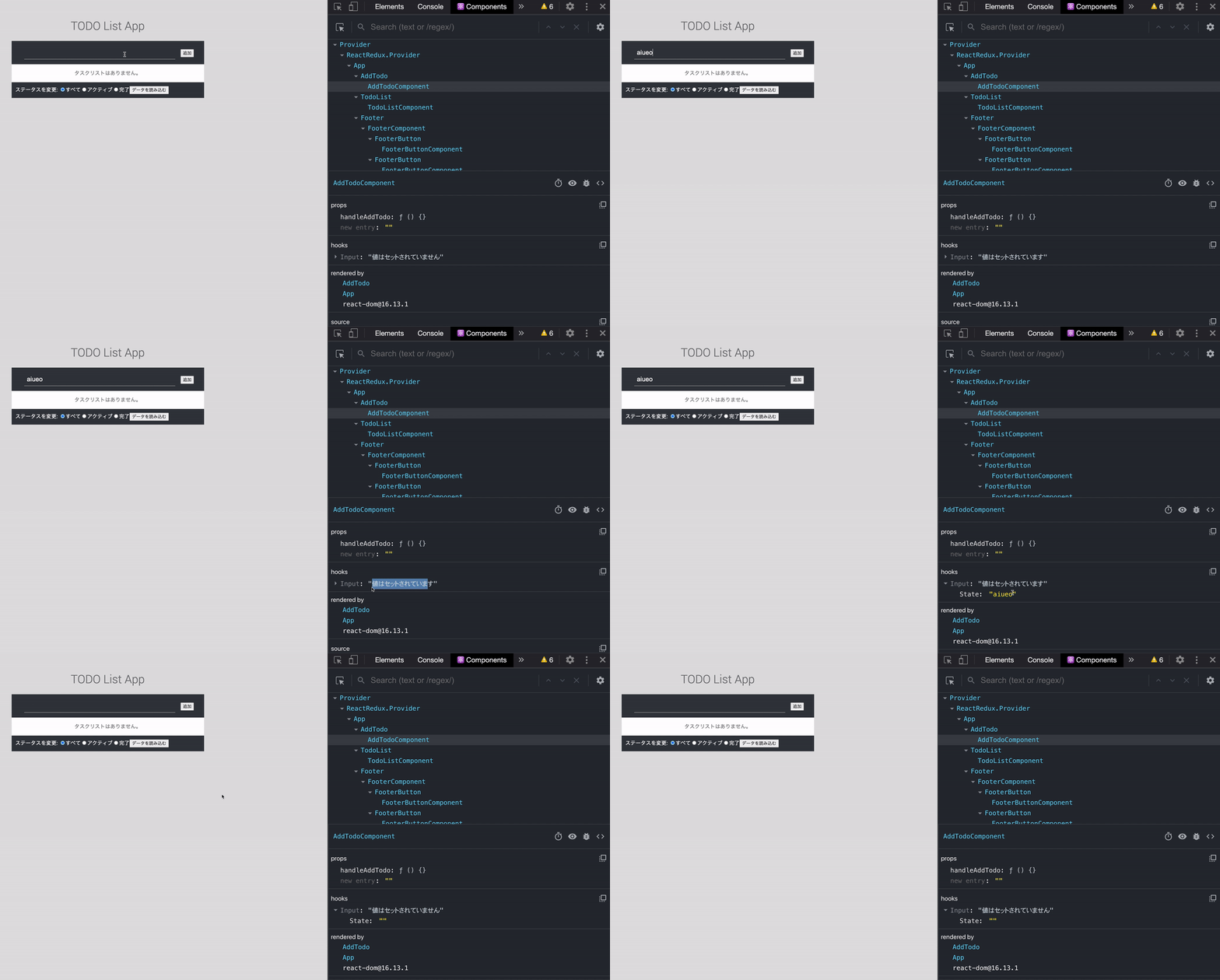
You can see that the value specified with the useDebugValue Hook is displayed as debugging information for the custom Hook.
Conclusion
Hooks are now used frequently in React application development. However, using them incorrectly can degrade performance or become a source of infinite loop bugs.
React officially provides eslint-plugin-react-hooks, a plugin that checks whether Hooks are being used correctly according to the rules. Use it where appropriate. Because eslint-plugin-react-hooks also handles issues detected by React Compiler, it helps check code quality for future optimization. This is useful even in projects that have not adopted React Compiler.