
Many years have passed since React was released as open source in 2013. Today, React is widely used in product development for single-page applications (SPAs).
React was originally created as an internal project at Facebook, now Meta. It has since been transferred to the React Foundation.
The React community is also highly active. Many libraries and frameworks built on React as a core technology, such as Next.js and React Native, have been released.
Because React has a long history, the web is full of articles that mix old and new techniques. Many developers may wonder, “Is the approach in this article still valid today?” or “What is the current best practice?”
For developers with those questions, this article looks back at how React has changed from around 2015 to the present and summarizes knowledge that remains useful today.
Looking back at React’s history
Here is a brief summary of the React changes covered in this article, starting around 2015.
| Period | Main updates |
|---|---|
| October 2015 | The React package was split into react and react-dom.Stateless functional components (SFCs) were added. |
| April 2016 | React 15.0.0 was announced. |
| July 2016 | PureComponent was added. |
| April 2017 | React.propTypes was deprecated. |
| June 2017 | React.createClass was deprecated. |
| September 2017 | The license was changed from BSD + Patents to the MIT license. React 16.0.0 was announced. Changes included updated return values for the render function, Error Boundary,and removal of deprecated packages. |
| November 2017 | React.Fragment was added. |
| March 2018 | The componentWill~ lifecycle methods were deprecated. |
| October 2018 | React.memo, React.lazy, and React.Suspense were added. |
| February 2019 | Hooks were added. |
| August 2019 | Deprecated lifecycle methods were removed. |
| February 2020 | React.createFactory was deprecated. |
| October 2020 | React 17.0 was released. (No new features were added.) |
| March 2022 | React 18.0 was released. Concurrent rendering, automatic batching, transitions, and StrictMode changes were introduced. |
| December 2024 | React 19.0 was released. Features related to asynchronous processing, Server Components, and support for passing ref as a prop were added. |
| October 2025 | React Compiler 1.0 was released. Build-time optimization through automatic memoization became available. |
| February 2026 | The React Foundation was formally launched. React, React Native, JSX, and related projects were transferred from Meta to the React Foundation. |
| June 2026 | The main React repository on GitHub was transferred from facebook/react to react/react. |
The changes include not only feature improvements, but also deprecations and changes in governance.
2015 onward: before the official release of ES2015
Until ES2015 was officially released in June 2015, React.createClass was commonly used to create React components.
It was React’s own feature for creating class components.
var Component = React.createClass({
  render: function() {
    return ReactDOM.tagName({options, "Hello"})
  }
});

React.renderComponent(
  Component(null),
  document.getElementById("root")
)
2016 onward: the age of class components
Starting with React 15.0.0, React.createClass was used far less often, and creating class components with the ES2015 class syntax became the mainstream approach.
When type checking was needed for efficiency, React.propTypes, which was built into React, could be used to show console warnings when types did not match.
class Component extends React.Component {
  render() {
    return (
      <h1>Hello, {this.props.name}</h1>
    );
  }
}

Component.propTypes = {
  name: React.PropTypes.string.isRequired
};
Class components are still commonly seen in many articles today.
2017 onward: the arrival of React 16.0.0
React 16.0.0 was announced in 2017. It included major improvements such as changes to the internal algorithm, better error handling, and improved return values from render functions. Let’s look back at what changed.
Did React clash with Apache? The license issue
There was once an issue involving React’s license. Some Facebook OSS projects originally used a custom BSD license with an additional patent clause.
In simple terms, the clause meant that “if you file a patent lawsuit against Facebook or a Facebook affiliate, you lose the right to use Facebook-related code.”
The Apache Software Foundation (ASF), a nonprofit organization, announced that Facebook’s BSD license with the patent clause violated its policy and would not be allowed for ASF use. The ASF 3rd Party License Policy shows that Facebook’s BSD license was classified under “Category X,” which is effectively a prohibited category.
At first, Facebook stated that it did not intend to change the license. However, after the community response, React was relicensed under the MIT license around the same time React 16.0.0 was released. The background is also described in the Facebook Engineering Blog.
Externalizing several packages that had been tied to React
Starting with React 16.0.0, the following deprecated features were removed from the React package and separated into external packages to optimize code size.
React.createClass: a feature for creating component classesReact.propTypes: React’s own feature for type-checking props
Both features have already been removed from current versions. Unless there is a specific reason to use them, the following approaches are preferable.
- Create components with
React.Componentor function components. - Use TypeScript when type checking is needed.
For new development with React + TypeScript, see the article 最新版TypeScript+webpack 5の環境構築まとめ(React, Three.jsのサンプル付き).
The virtual DOM update algorithm changed to Fiber
Starting with React 16.0.0, the virtual DOM update algorithm changed from the conventional Stack approach to an architecture called Fiber.
Frameworks that use a virtual DOM compare the old virtual DOM tree when updates are detected and rebuild only the changed parts. This diffing algorithm is called reconciliation.
With the Stack approach, when a component was re-rendered, re-rendering, reconciliation, and updates to the view were performed synchronously across the entire child tree. As a result, components with complex structures could block the application view during updates, causing lag.
With Fiber, React assigns priorities to the scheduling of work. Reconciliation is performed by dividing virtual DOM updates into units called Fiber, which are independent linked lists. Rendering is executed after the full set of update work has completed.
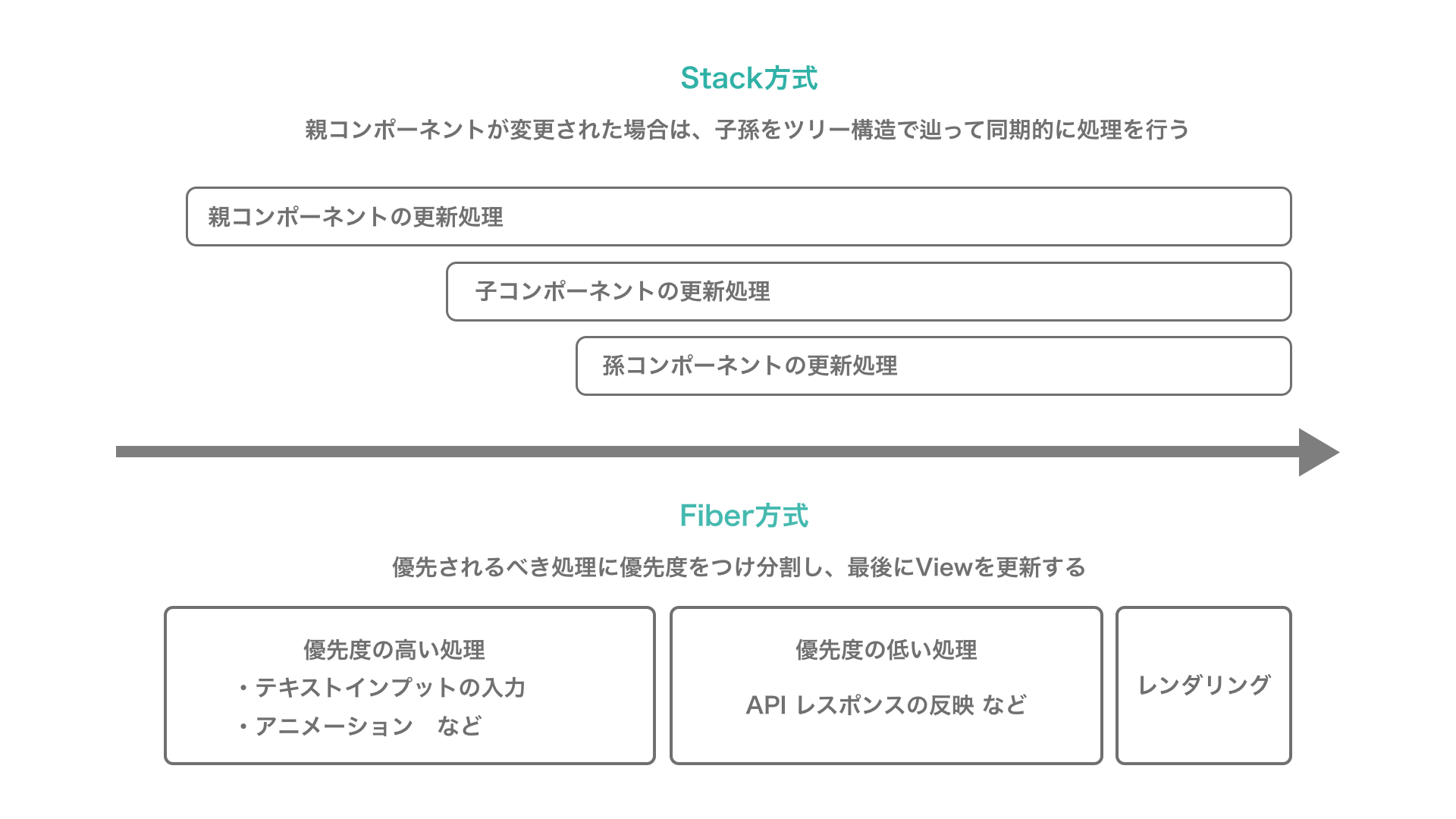
Processes that need to be reflected immediately, such as animations and text input, are assigned higher priority. This helps reduce interruptions to user interactions.
Because JavaScript basically runs on a single thread, React internally uses requestAnimationFrame and requestIdleCallback to adjust scheduling priorities in a pseudo-asynchronous way.
Fragment syntax was added
In React, outputting multiple elements as a component used to be difficult.
render() {
  return (
    {/* An error occurs if there are multiple top-level elements. */}
    <ChildA />
    <ChildB />
    <ChildC />
  );
}
In cases like this, the top-level elements had to be wrapped in a div or similar element and returned as a single JSX element.
With React.Fragment, added in React 16.2.0, HTML can be rendered without adding unnecessary DOM elements.
render() {
  return (
    <Fragment>
      <ChildA />
      <ChildB />
      <ChildC />
    </Fragment>
  );
}
React.Fragment can also be written with shorthand syntax.
render() {
  return (
    <>
      <ChildA />
      <ChildB />
      <ChildC />
    </>
  );
}
Error Boundary
Starting with React 16.0.0, a feature was added for handling errors that occur in the component tree. By setting up a specific component as a parent component, React can detect errors that occur in child components. This mechanism is called an Error Boundary.
class ErrorBoundary extends React.Component {
  constructor(props) {
    super(props);
    this.state = { hasError: false };
  }

  // Catch errors before rendering.
  componentDidCatch(error, info) {
    this.setState({ hasError: true });
  }

  render() {
    // If an error occurred, show fallback text.
    if (this.state.hasError) {
      return <h1>An error occurred.</h1>;
    }
    // Otherwise, show the child components.
    return this.props.children;
  }
}

<ErrorBoundary>
  <MyComponent />
</ErrorBoundary>
Using Error Boundaries made it easier to show fallback UI and identify where errors occurred.
Several lifecycle methods were deprecated
Starting with React 16.3.0, the following lifecycle methods were deprecated and given the UNSAFE_ prefix.
componentWillMountcomponentWillReceivePropscomponentWillUpdate
They were deprecated because they were likely to cause bugs when React supported asynchronous rendering in the future. Starting with React 16.9.0, these lifecycle methods were treated as fully deprecated.
React.lazy
Starting with React 16.6.0, a feature similar to dynamic import called React.lazy was implemented.
It lets dynamically loaded components be loaded lazily, reducing bundle size.
const LazyComponent = React.lazy(() => import('./LazyComponent'));
React.Suspense
Starting with React 16.6.0, a feature called Suspense was added.
It is similar to Error Boundary, but Suspense catches Promises instead of errors.
When combined with the React.lazy() described above, it becomes easier to create components that handle asynchronous processing.
const LazyComponent = React.lazy(() => import('./LazyComponent'));

const Component = () => {
  return (
    <div>
      {/* While loading, "Loading..." is shown as fallback UI. */}
      <Suspense fallback={<div>Loading...</div>}>
        <LazyComponent />
      </Suspense>
    </div>
  );
}
- Rendering waits while the Promise has not resolved.
- When the Promise completes, rendering runs again.
The displayed result can be switched based on the Promise state.
For example, asynchronous processing in React often requires managing the following:
- State for determining whether loading is in progress
- UI for the loading state
- State changes after the asynchronous process finishes so the result can be shown
Code for implementing all of this tended to become verbose. With the arrival of React.Suspense and React.lazy, this mechanism can be created without using state.
For details about Suspense, see the official React documentation, <Suspense> – React.
React.memo
React provided PureComponent, which is useful for improving performance.
It prevents re-rendering when state and props have not changed, reducing the number of renders.
However, PureComponent could only be used with class components.
Starting with React 16.6.0, React.memo made it possible to apply PureComponent-like behavior to function components.
const Component = ({ props }) => <div>{props.name}</div>;

const MemoComponent = React.memo(Component);
Context API
As a basic React principle, data is passed top-down through props, from parent to child. Because of this, data often has to be passed through multiple layers of components until it reaches the component that needs it, a pattern sometimes called “prop drilling.” Passing properties that are needed by many components across an application, such as UI theme settings or language settings, can become very cumbersome.
// Parent component
class ParentComponent extends React.Component {
  constructor(props) {
    super(props);
    this.state = { theme: "dark" };
  }
  render() {
    return (
      <>
        <h1 className={`title_${this.state.theme}`}>Theme</h1>
        <ChildComponent theme={this.state.theme} />
      </>
    );
  }
}

// Child component
class ChildComponent extends React.Component {
  constructor(props) {
    super(props);
  }
  render() {
    return (
      <div className={`block_${this.props.theme}`}>
        <GrandChildComponent theme={this.props.theme} />
      </div>
    );
  }
}

// Grandchild component
class GrandChildComponent extends React.Component {
  constructor(props) {
    super(props);
  }
  render() {
    return <p>The current color theme is {this.props.theme}.</p>
  }
}
React provides a useful feature called the Context API. This API makes it possible to handle data that can be shared globally with a component tree.
// Create a context.
const Context = React.createContext();

// Parent component
class ParentComponent extends React.Component {
  constructor(props) {
    super(props);
    this.state = { theme: "dark" };
  }
  render() {
    return (
      {/* Pass the value to manage to the Provider component. */}
      <Context.Provider value={this.state}>
        <h1 className={`title_${this.state.theme}`}>Theme</h1>
        <ChildComponent />
      </Context.Provider>
    );
  }
}

// Child component
export default class ChildComponent extends React.Component {
  render() {
    return (
      {/* Refer to the context. */}
      <div className={`block_${this.context.theme}`}>
        <GrandChildComponent theme={this.context.theme} />
      </div>
    )
  }
}

// Specify the context object to refer to.
ChildComponent.contextType = Context;
Because Context shares data at a global level, it can make components harder to reuse. When using it, try to manage only state that is commonly held across the application.
2018 onward: the shift to function components
Around 2018, the mainstream approach for React components shifted from class components to function components, because function components can reduce code volume, improve readability, and make testing easier.
At the time, UI was often created with an approach called Stateless Functional Components (SFCs), where components held as little state as possible. For state management and update processing, techniques such as higher-order components, described later, were commonly used.
Higher-order components and render props
Before the Hooks API was released, a design pattern called Higher-Order Components became widely used as an advanced technique. This technique was created to abstract behavior by focusing on separating component logic.
A higher-order component is a function that receives an existing component and returns a newly transformed component. It transforms the original component by wrapping it inside a container component.
// Receive a component as an argument.
function enhance(WrappedComponent) {
  return class extends React.Component {
    // Write the logic for the functionality to add.
    onClick(event) {
      console.log(event);
    }
    render() {
      // Return a new component with the added functionality.
      return <WrappedComponent {...this.props} onClick={this.onClick} />;
    }
  }
}
// Stateless component
const BaseComponent = (props) => {
  return <div>{props.title}</div>
};

// Compose functionality with a function.
const EnhancedComponent = enhance(BaseComponent);

// A div element is shown, and clicking it outputs to the console.
<EnhancedComponent />
By extracting commonly reusable logic and preparing a function that composes it with a view component, component responsibilities could be separated.
Render props
Around the same period as higher-order components, another technique called render props attracted attention.
The basic idea of separating logic is the same as with higher-order components. The difference is that instead of taking a component as an argument, a component to render is passed as a function through props.
In the example below, ContainerComponent handles the logic, and ViewComponent handles rendering.
Data is passed from the props of ContainerComponent as an argument, and ViewComponent receives it.
const ParentComponent = () => {
  // Pass the component to render as a function through the render prop.
  return <ContainerComponent render={
    data => <ViewComponent data={data} />}
  />;
};

// Component that receives data and handles rendering.
const ViewComponent = ({ data }) => {
  return data.map((item, index) => (
    <p key={item}>
      {item}
    </p>
  ));
};

// Container component that contains the logic.
class ContainerComponent extends React.Component {
  constructor() {
    super();
    this.handleClick = this.handleClick.bind(this);
    this.state = {
      lists: ["hoge", "fuga", "piyo"],
      clickId: null
    };
  }
  // Toggle the "selected" CSS class on the clicked element.
  handleClick(event) {
    event.target.classList.toggle("selected");
  }
  render() {
    return (
      <div onClick={this.handleClick}>
        {/* Pass the value to render. */}
        {this.props.render(...this.state)}
      </div>
    );
  }
}
Recompose
Higher-order components and function components had a weakness. They could not use some of React’s most important features, such as lifecycle methods and state.
Until the Hooks API, described later, appeared, those features were attached to class components and could not be used in function components.
To solve this problem, a library called Recompose was created.
This library adds local state and lifecycle methods to the function components described above. As a result, state could be controlled without defining class components. For a time, a setup combining higher-order components and Recompose was treated as something close to a best practice for React projects.
However, shortly after Andrew Clark, the developer of Recompose, joined the React team and helped develop and announce Hooks, development of Recompose stopped.
Looking at the GitHub issues, some contributors seem to have tried extracting Recompose features into separate libraries. Recompose has not been actively developed for a long time, and the author himself recommends using Hooks. For that reason, Hooks should be used for future React development.
2019 onward: the arrival of the Hooks API
After Hooks appeared, there were fewer benefits to designing with higher-order components, and writing only function components became increasingly common.
With Hooks, introduced in React 16.8.0, React features such as state and props can be used without declaring class syntax.
import React, { useState, useCallback } from 'react';

const Example = () => {
  // Create a state variable.
  const [count, setCount] = useState(0);

  const handleSetCount = useCallback(() => {
    // Update the state.
    setCount(count + 1)
    // Pass the dependent values as an array to the second argument.
    // The function passed as the first argument runs only when these values change.
  }, [count])

  return (
    <div>
      <p>{count}</p>
      <button onClick={handleSetCount}>
        Click
      </button>
    </div>
  )
};
In current versions of React, the lifecycle methods that were previously available in class components are mostly covered by compatible functionality.
However, componentDidCatch and getDerivedStateFromError, lifecycle methods used for the Error Boundaries described earlier, are not implemented in the current Hooks API.
The main benefits of the Hooks API include the following:
- Components become simpler and more readable.
- There is no need to struggle with JavaScript’s troublesome
thisbehavior. - Because Hooks themselves are functions, reusable logic can be extracted from components.
As a library policy, there seems to be no plan to remove class components from React. However, considering that future new features are likely to be provided on a Hooks basis, class components may become a legacy style over time. For new React development, creating components as functions rather than classes is generally preferable.
Use Hooks correctly and carefully
Hooks are very useful, but if the correct dependencies are not passed to the second argument, deps, there is a risk of infinite loops and other problems.
One solution is to use the ESLint plugin eslint-plugin-react-hooks. It warns about incorrect dependencies in Hooks.
When using Hooks for the first time, start with only the built-in Hooks such as useState and useEffect to get a feel for them.
For more information about Hooks, the official reference provides extensive documentation.
React.createFactory was deprecated
Starting with React 16.13.0, React.createFactory, which creates React elements without JSX syntax, was deprecated.
When using React without JSX, call React.createElement instead.
class Component extends React.Component {
  render() {
    return React.createElement('div', null, `Hello ${this.props.name}`);
  }
}

ReactDOM.render(
  React.createElement(Hello, {name: 'Taro'}, null),
  document.getElementById('root')
);
2021 onward: React 17 had no new features
React 17 was released as a stepping stone toward React 18. As introduced in the official blog as “No New Features,” no new features were added.
This was the last React version to support Internet Explorer 11.
In October 2021, Facebook also changed its company name to Meta. React continued to be developed as OSS led by Meta.
2022 onward: concurrent rendering in React 18
The highlight of React 18 was support for concurrent rendering. There were not many changes to how React is written with Hooks, but there were internal optimizations and behavior changes.
Starting with React 18, the initialization method changed. Previously, React was initialized with ReactDOM.render(), but React 18 uses createRoot().render().
import React from "react";
import { App } from "./App";
import { createRoot } from "react-dom/client";

const root = createRoot(document.getElementById("root"));

root.render(
  <React.StrictMode>
    <App />
  </React.StrictMode>
);
React.StrictMode behavior also changed. To detect unsafe lifecycles, when running in development mode, useEffect() calls intended for mounting are executed twice.
In React 18, Suspense was also officially introduced. As described earlier, it had already been included in a limited form since React 16.6.
2024 onward: React 19 expands asynchronous features and introduces Server Components
React 19 also added many features. This section introduces the main ones. For details, see the official React blog, React v19 – React.
Asynchronous processing became more convenient
React apps often need to run asynchronous processing in response to user actions and then display the result. React 19 added features that make asynchronous processing and form handling more convenient.
For example, the useActionState Hook can manage the state of an action while it is in progress, as well as the result of the action. As shown below, pass an action function to useActionState, and it returns the asynchronous result, the wrapped action, and the pending state.
const Form = () => {
  const submit = async (newName) => {
    const error = await updateName(newName);
    return error;
  };
  const [error, submitAction, isPending] = useActionState(submit);

  return (
    <form action={submitAction}>
      <input type="text" name="name" />
      <button type="submit" disabled={isPending}>Update</button>
      <span>{error}</span>
    </form>
  );
};
The newly added use API makes it possible to write data fetching for asynchronous processing more simply.
In the example below, the asynchronous fetchUsers() function is passed to the use API. Previously, this kind of code required useEffect, useState, and similar APIs. With use, the code becomes much simpler. In this case, while fetchUsers is loading, the Suspense fallback is displayed. Once fetching completes, the user names are displayed.
const Users = () => {
  const users = use(fetchUsers);
  return users.map((user) => <p>{user.name}</p>);
};

const UserList = () => (
  <Suspense fallback={<p>Loading...</p>}>
    <Users />
  </Suspense>
);
Other additions include useOptimistic for optimistic updates and useFormStatus for getting form state.
Server Components
Server Components are components that are rendered in advance on the server at build time or request time, and whose result is returned to the client. They can reduce JavaScript bundle size and improve initial loading time.
For details, see the official React documentation: Server Components – React.
ref can now be passed as a prop
Before React 19, forwardRef was used when passing a ref from a parent component to a child component. Starting with React 19, ref can be passed as a prop.
const Parent = () => {
  const ref = useRef();
  return (
    <div>
      Parent component
      <Child ref={ref} />
    </div>
  );
};

const Child = ({ ref }) => <span ref={ref}>Child</span>;
2025 onward: React Compiler became stable
In October 2025, React Compiler 1.0 was released and became available as a stable version.
React Compiler is not a runtime API for React. It is a tool that analyzes and optimizes React apps at build time. Because it automatically memoizes components and Hooks, it can reduce the need to manually use useMemo, useCallback, and React.memo.
Lint rules derived from React Compiler have also been integrated into eslint-plugin-react-hooks.
2026 onward: transfer to the React Foundation
React had long been led by Facebook, now Meta, but in February 2026, the React Foundation was formally launched under the Linux Foundation. Related projects such as React, React Native, and JSX are no longer owned by Meta; they are now owned by the independent React Foundation.
Along with this transfer, the main React repository on GitHub was also moved from facebook/react to react/react in June 2026.
Conclusion
React regularly receives major updates such as React Fiber and the Hooks API, and because it has a long history, deciding which information to use can be difficult.
However, React has clearly become more convenient for developers, with features for optimizing performance and handling asynchronous processing.
ICS MEDIA also covers the Hooks API described above with source code in articles such as React Hooks and Reactで作る、WAI-ARIA対応のアクセシブルなタブ型UI. See those articles as well.