Anyone who has worked with dates in JavaScript has probably written new Date(2026, 3, 15) intending to create a date in March, only to get April instead. Zero-based months are just one quirk of the Date class. Date arithmetic, formatting, and time zone handling are also cumbersome. Libraries such as date-fns and Day.js have long been used to make up for these limitations.
That is set to change with Temporal, a new standard API designed from the ground up as a replacement for the Date class. The proposal has been under discussion since around 2017. Its specification is now finalized, and it is scheduled for inclusion in ECMAScript 2027. Unlike a library-specific API, a standard API is knowledge you can keep using for years. This article reviews the shortcomings of Date, explains how to use Temporal, and walks through an implementation based on a reservation system.
Why the Date class fell short
The Date class has many rough edges, but the following three are among the most common sources of trouble in real-world development.
Zero-based months
First is the zero-based month problem mentioned at the beginning. Days are one-based, but months alone are zero-based.
// Intended to represent March 15, 2026, but creates April 15
const date = new Date(2026, 3, 15);
This zero-based convention affects both writing and reading dates. When extracting a numeric month for display, you have to add 1 to getMonth(). Because ISO 8601 strings (2026-03 means March) and database date values use one-based month numbers, conversions to and from zero-based getMonth() are easy to get wrong.
const date = new Date(2026, 2, 15); // March 15, 2026 (2 because months are zero-based)
console.log(date.getMonth()); // 2: displayed as-is, this looks like February
console.log(date.getMonth() + 1); // 3: the +1 is required for display
I have also made this mistake many times, forgetting the +1 and displaying a date one month off.
There is one advantage to zero-based months: the value returned by getMonth() can index an array of month names directly. Seen purely as array indexing, the design is reasonable. The problem is that days are one-based while months alone are zero-based, creating an inconsistency within the Date class itself. Every month operation requires developers to switch between zero-based and one-based values, which invites mistakes.
Mutable objects
Another problem is mutability. Calling methods such as setDate() modifies the original Date object. If the same object is shared in multiple places, this can cause unexpected changes.
const a = new Date(2026, 0, 1);
const b = a; // Shares the same reference
b.setDate(15);
console.log(a.getDate()); // 15: a changed too
No support for calculations in arbitrary time zones
The biggest problem is time zones. A Date object stores a single instant on the timeline; it cannot retain a time zone ID such as Asia/Tokyo. Its API only exposes that instant in two frames of reference: the runtime’s local time and UTC (Coordinated Universal Time). There is no built-in way to construct dates or perform arithmetic in an arbitrary named time zone. Because the date libraries mentioned above provide this capability, working with time zones has historically required a library.
UTC is the world’s reference time standard, and Japan Standard Time (JST) is nine hours ahead of it.
// Which time zone this 14:00 belongs to depends on the runtime environment.
// On a server set to UTC, it is 14:00 UTC; in Tokyo, it is 14:00 JST.
// Those are different instants.
const d = new Date(2026, 6, 10, 14, 0);

// It can be displayed in another time zone, but...
console.log(d.toLocaleString("ja-JP", { timeZone: "America/New_York" }));
// There is no standard Date API for creating and calculating with "14:00 in New York."
Temporal basics
For date-only values, start with Temporal.PlainDate. It represents a date without a time zone, so you can work with a calendar date without worrying about local time or UTC.
Create a date with from(), which accepts a string, or Temporal.Now.plainDateISO(), which returns today’s date.
const date = Temporal.PlainDate.from("2026-07-10");
const today = Temporal.Now.plainDateISO();
The year, month, and day are available as properties. Months are one-based, so July is 7.
date.year; // 2026
date.month; // 7 (one-based)
date.day; // 10
date.dayOfWeek; // 5 (Monday is 1; Sunday is 7)
Use dedicated methods for arithmetic and comparison. add() handles operations such as “three days later,” while with() replaces selected fields, for example setting the day to 1 to find the first day of the month. For comparison, the static compare() method reports ordering, and equals() tests equality.
const deadline = date.add({ days: 3 }); // Three days later
const firstDay = date.with({ day: 1 }); // First day of the month

Temporal.PlainDate.compare(date, deadline); // -1 (date is earlier)
date.equals(deadline); // false
Passing a locale to toLocaleString() formats the date according to that locale’s conventions.
date.toLocaleString("ja-JP"); // "2026/7/10"
date.toLocaleString("en-US"); // "7/10/2026"
None of these operations modify date itself. Temporal eliminates two longstanding sources of trouble in Date: zero-based months and mutability.
Common date arithmetic pitfalls
The following examples show how Temporal handles situations that were especially easy to get wrong with Date.
Calculations across month boundaries
Month arithmetic is more predictable as well. With the Date class, adding “one month” can produce an unexpected date because overflow rolls into the following month.
const d = new Date(2026, 0, 31); // January 31
d.setMonth(d.getMonth() + 1); // Intended to mean "one month later"
// February 31 does not exist, so the result is March 3
With Temporal, add({ months: 1 }) constrains the result to the last valid day of the target month when that month does not contain the same day number.
const endDate = Temporal.PlainDate.from("2026-01-31").add({ months: 1 });
console.log(endDate.toString()); // "2026-02-28" (February has no 31st, so it uses the last day)
When the requirement is to add a number of days rather than calendar months, change the unit. For example, add({ days: 30 }) calculates a date 30 days later.
Converting between Date and Temporal
Values can be converted between Temporal and the existing Date class, so there is no need to rewrite an entire codebase at once. Migration can proceed incrementally, starting with newly written code.
const legacy = new Date();
const instant2 = legacy.toTemporalInstant(); // Convert Date to Temporal
const back = new Date(instant2.epochMilliseconds); // Convert Temporal to Date
Temporal’s mental model: calendar and wall-clock values versus exact time
PlainDate, used so far, represents a calendar date without a time zone. More broadly, Temporal’s classes fall into two categories: calendar and wall-clock values, and exact points on the global timeline.
Suppose a Tokyo store and a London store both say, “We open at 9:00 a.m.” The 9:00 a.m. in each case is a wall-clock value without a time zone. The clocks show the same time, but 9:00 a.m. in Tokyo and 9:00 a.m. in London are different instants, several hours apart. Once the date, time, and time zone are combined, the value identifies a single point on the global timeline.
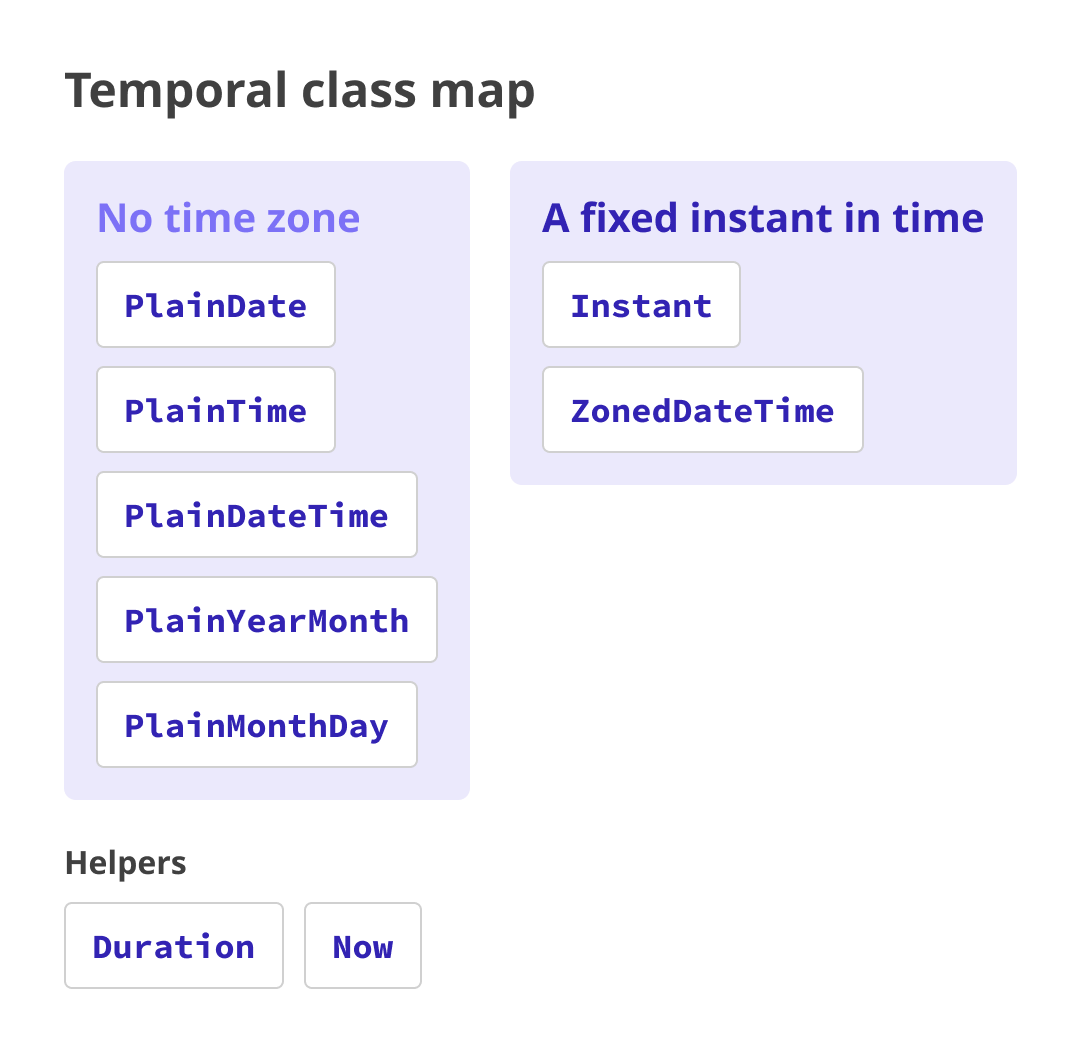
Classes whose names begin with Plain are like readings on a wall clock: by themselves, they do not identify a region. Temporal.PlainDate represents a date such as July 10, 2026, while Temporal.PlainTime represents a time such as 2:30 p.m.
By contrast, Temporal.Instant and Temporal.ZonedDateTime represent exact points on the global timeline. When the time zone is known, the official recommendation is to use Temporal.ZonedDateTime, which stores the date, time, and time zone together. Conceptually, Temporal.Instant, which represents only an exact point in time, is the closest counterpart to the legacy Date class.
Let’s confirm this in code. The world clock demo below also displays the same instant in each city’s local time.
// The current instant: one exact point on the timeline
const now = Temporal.Now.instant();

// Applying a time zone displays the same instant as that region's wall-clock time.
// The demo repeats this for every city.
console.log(now.toZonedDateTimeISO("Asia/Tokyo").toString());
// Example: "2026-07-10T14:30:00+09:00[Asia/Tokyo]"
console.log(now.toZonedDateTimeISO("America/New_York").toString());
// Example: "2026-07-10T01:30:00-04:00[America/New_York]"
Demo: rewriting date and time handling for a reservation system
The following example uses a simple reservation system. Try the demo below first. Switching stores shows how the same reservation instant appears in each time zone.
The implementation handles three distinct concepts: a reservation date, a start time, and a duration of 90 minutes. It then combines them with the store’s time zone to identify one exact point in time. The Date class, however, has no type for a date-only or time-only value. Instead, the date and time have to be folded into a single Date, while the duration requires manual millisecond arithmetic. That has historically led to workarounds like the following.
// Reservation date and start time. Date cannot represent them separately,
// so they are combined in one object.
const start = new Date(2026, 6, 10, 14, 30); // July 10, 2026 at 14:30 (months are zero-based)
// End time after a 90-minute reservation. Minutes must be converted to milliseconds.
const end = new Date(start.getTime() + 90 * 60 * 1000);
// There is no way to create "14:30 at the Tokyo store"; this uses the runtime's local time.
With Temporal, dates use PlainDate and times use PlainTime, so each concept has its own dedicated type. First, construct the reservation date and start time separately.
const day = Temporal.PlainDate.from("2026-07-10"); // Reservation date
const start = Temporal.PlainTime.from("14:30"); // Start time
const end = start.add({ minutes: 90 }); // End time 90 minutes later
console.log(`${start} – ${end}`); // "14:30:00 – 16:00:00"
No conversion to milliseconds is needed; simply add the 90-minute duration with add(). Because the date and time use separate types, they can remain separate values until they need to be combined.
Next, apply the store’s time zone to the reservation date and time, turning them into a ZonedDateTime that identifies a globally unambiguous instant. toZonedDateTime() combines the date, time, and time zone. withTimeZone() preserves the same instant while changing the time zone used to display it.
// Combine the reservation date and start time with the store's time zone
// to identify an exact point in time.
const reserved = day.toZonedDateTime({ timeZone: "Asia/Tokyo", plainTime: start });

// Show that same instant in the user's local time zone.
console.log(reserved.withTimeZone("America/New_York").toString());
This makes it possible to show the same instant in each user’s local time.
Demo: calculating time differences with daylight saving time
The ZonedDateTime class also handles changes in time-zone offsets caused by daylight saving time (DST). In the demo below, select two cities and a date to see the time difference on that day. Switching the date between February 1 and July 1 changes the difference by one hour because of DST.
Daylight saving time advances clocks by one hour, generally from spring through fall. The dates vary by country and region, and during that period the time difference from other regions changes by one hour. For example, Tokyo is eight hours ahead of London while London observes daylight saving time, and nine hours ahead during standard time.
Below is an excerpt from the diffHours function used in the time difference demo. It treats noon in city A on the selected date as the reference instant, views that same instant in city B, and calculates the time difference from the two UTC offsets.
// Excerpt from diffHours() in the time difference demo (docs/03_dst/)
function diffHours(dateStr, tzA, tzB) {
  const atA = Temporal.PlainDate.from(dateStr).toZonedDateTime({
    timeZone: tzA,
    plainTime: Temporal.PlainTime.from("12:00"),
  });
  const atB = atA.withTimeZone(tzB);
  return (atA.offsetNanoseconds - atB.offsetNanoseconds) / 3_600_000_000_000;
}

// The Tokyo-London difference changes depending on daylight saving time
diffHours("2026-07-10", "Asia/Tokyo", "Europe/London"); // 8 hours (DST in London)
diffHours("2026-01-10", "Asia/Tokyo", "Europe/London"); // 9 hours (standard time)
With the Date class, specifying a time zone in Intl.DateTimeFormat can produce a display that accounts for daylight saving time. However, obtaining the offset itself as a number requires custom calculation because Date provides no standard way to retrieve it.
Temporal keeps the time zone ID together with the date and time, and exposes the offset directly through offset (a string such as +09:00) and offsetNanoseconds. The same code therefore returns the correct difference for the selected date.
Browser and runtime support
The standard Temporal API is supported in Chrome 144 and Edge 144 (January 2026) or later, and Firefox 139 (May 2025) or later. Safari implementation is also underway, with support expected in a future release.
It is available on the server as well as in browsers. Starting with Node.js 26 (May 2026), Temporal is enabled by default, with no flag required. Date handling is often implemented server-side, so being able to use the same API on both the front end and back end is an advantage.
Reference: Can I use…
Conclusion
After remaining largely unchanged for decades, JavaScript date and time handling is finally gaining a modern standard API. After working with Date for so long, the change feels significant.
Most Temporal classes represent either calendar and wall-clock values (the Plain types) or exact points in time (Instant and ZonedDateTime). Once that distinction is clear, choosing the right class becomes much easier. Developers who have learned to brace themselves for date handling should give Temporal a try.
For more on date formatting, see 数値や日付をさまざまな形式の文字列に! toLocaleString()を使ってスマートに変換しよう.