
WebGPU is a next-generation graphics API for the web. It was designed as a successor to WebGL and provides lower-level, more efficient access to the GPU. As introduced in the article WebGPU: New graphics and compute possibilities beyond WebGL, it can potentially deliver better performance than WebGL.
Three.js is a JavaScript library for creating 3D content on the web. It has been widely used since the early days of WebGL in the 2010s, and it remains one of the standard libraries for web-based 3D.
Three.js is steadily gaining WebGPU support. It includes a WebGPU-capable renderer called WebGPURenderer, which can be used in almost the same way as the traditional WebGLRenderer. That means Three.js developers can take advantage of WebGPU without writing low-level GPU code. For now, WebGPURenderer is still considered a work in progress (WIP).
The main benefit of using WebGPU in Three.js is its long-term potential. This article explains the current state of WebGPURenderer in Three.js and the key points for adopting it.
Porting existing Three.js content to WebGPU
Using the WebGPU version of Three.js is straightforward. As explained later, content originally built for WebGL often works by simply switching the renderer. ICS MEDIA has published many original demos over the years, and several of them have already been ported to WebGPU.
- Open the demo in a new window
- View the source code
- From the article JavaScriptで作成するサウンドビジュアライザー - Web Audio APIで周波数解析
- Open the demo in a new window
- View the source code
- From the article 高機能なモーション制作用JSライブラリGSAPを使ったタイムリマップ表現
The following examples have also been ported to WebGPU.
Many projects were migrated from the traditional WebGLRenderer to WebGPURenderer, and it was surprising how easily they worked after the switch. Here are some takeaways from the process.
- If the content uses only built-in Three.js features, it can usually be ported just by switching the renderer. It really is that easy.
- If the code includes incompatible parts, they need to be fixed case by case, such as particles or lines.
- Shaders are not compatible as-is, so they need to be ported from GLSL to TSL, as explained later.
Three.js is not a WebGL-only library. In the past, it also included renderers that drew 3D scenes with SVG and Canvas 2D. Just as the underlying platform is shifting from WebGL to WebGPU, users generally do not need to worry much about the details. That is possible because Three.js abstracts 3D technology at a very high level.
Setup
The following steps show how to use WebGPU in Three.js. This explanation assumes previous experience with Three.js, especially WebGLRenderer.
-
Import Three.js
- Load the WebGPU build.
- When using a CDN, load
three.webgpu.jsinstead ofthree.module.js. - With Vite and similar tools, no additional configuration is required.
- When using a CDN, load
- In code, import it as an ES module with
import { WebGPURenderer } from "three/webgpu".
- Load the WebGPU build.
-
Create the renderer
- Create the renderer with
new WebGPURenderer(). - The constructor options use the same format as
WebGLRenderer.
- Create the renderer with
-
Initialize
- Call
await renderer.init();to initialize it. - The important point is that initialization is asynchronous and requires
await.
- Call
-
Render the scene
- As in standard Three.js code, create a
SceneandCamera, then callrenderer.render(scene, camera).
- As in standard Three.js code, create a
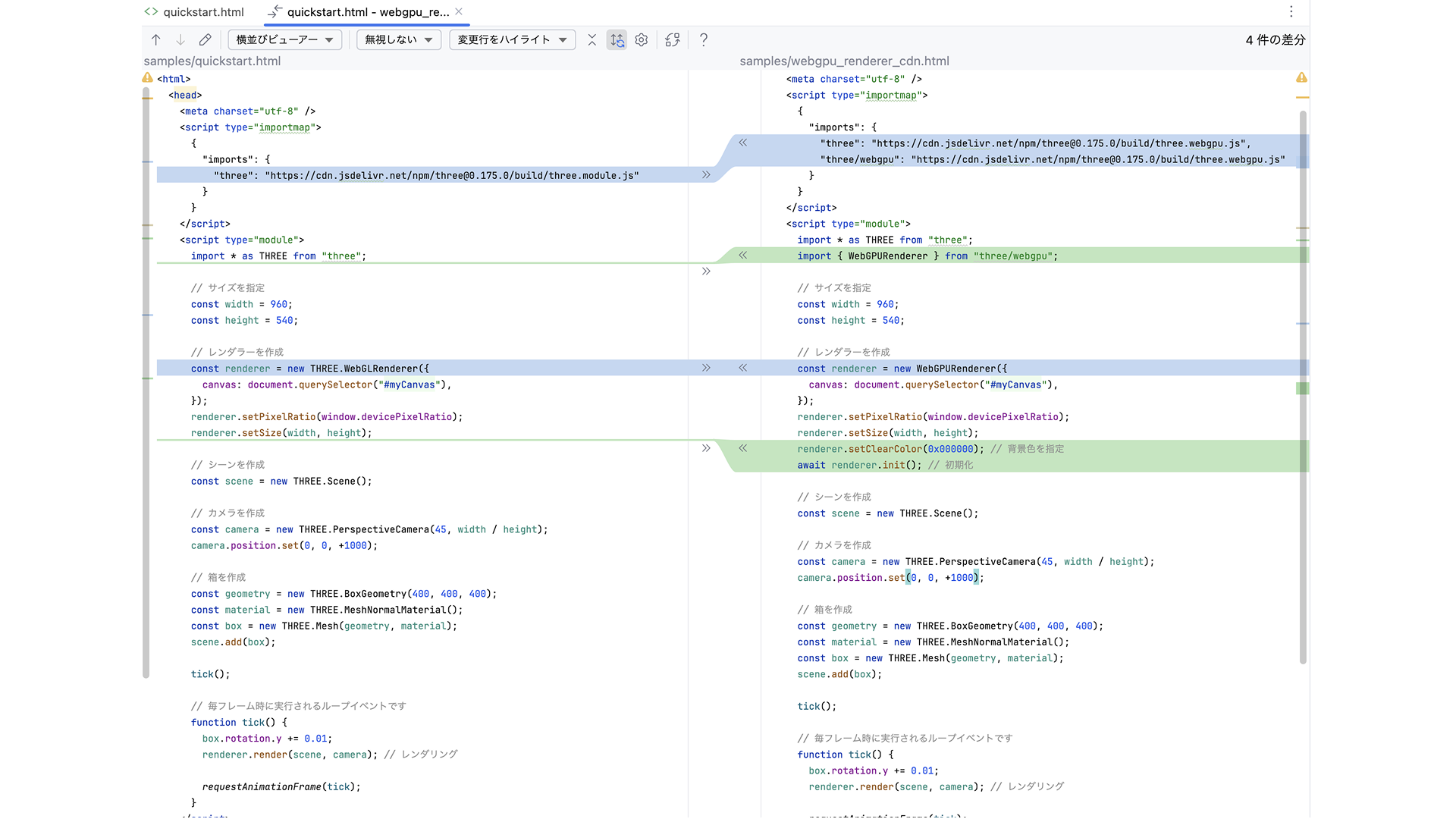
The difference between an implementation using WebGLRenderer and one using WebGPURenderer is shown below. As you can see, the changes are minimal.
For a more detailed walkthrough, see the following article on the ICS MEDIA Three.js tutorial site.
Fallback for browsers without WebGPU support
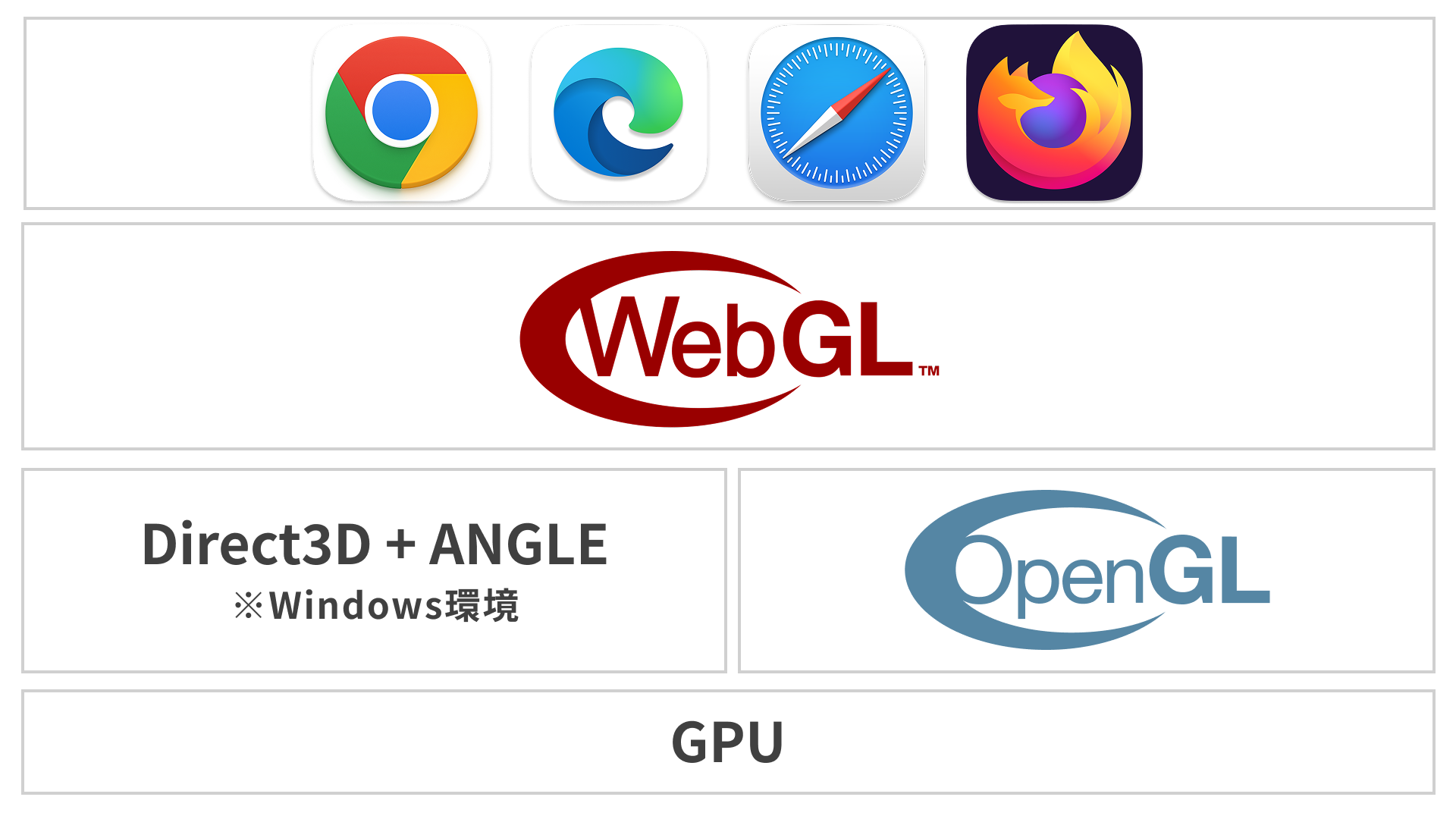
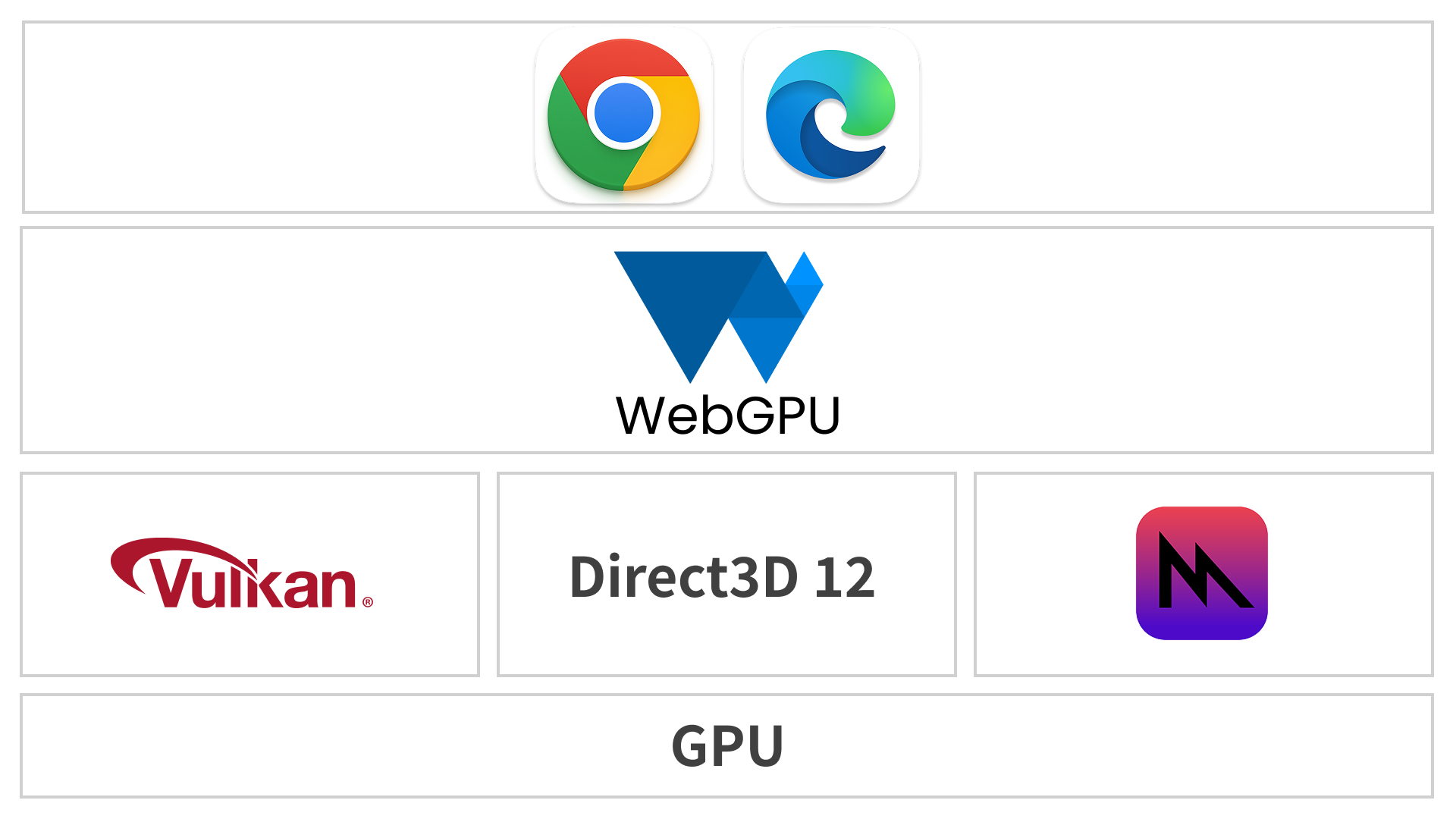
WebGL and WebGPU are different technologies. Because WebGL is supported by all browsers, it covers a wider range of environments. By contrast, WebGPU is supported in Chrome 113 and Edge 113 (May 2023), Safari 26.0 (September 2025), and Firefox 141 (July 2025, Windows only) (see Can I Use…).
WebGL technology stack
WebGPU technology stack
So if you use Three.js WebGPURenderer, does that mean the content cannot be displayed in browsers that do not support WebGPU?
One of the key features of Three.js WebGPURenderer is that it falls back to WebGL 2.0 when WebGPU is unavailable. Developers do not need to implement anything special. The renderer automatically chooses the best available backend for the user’s environment, making it possible to support a wide range of browsers and devices.
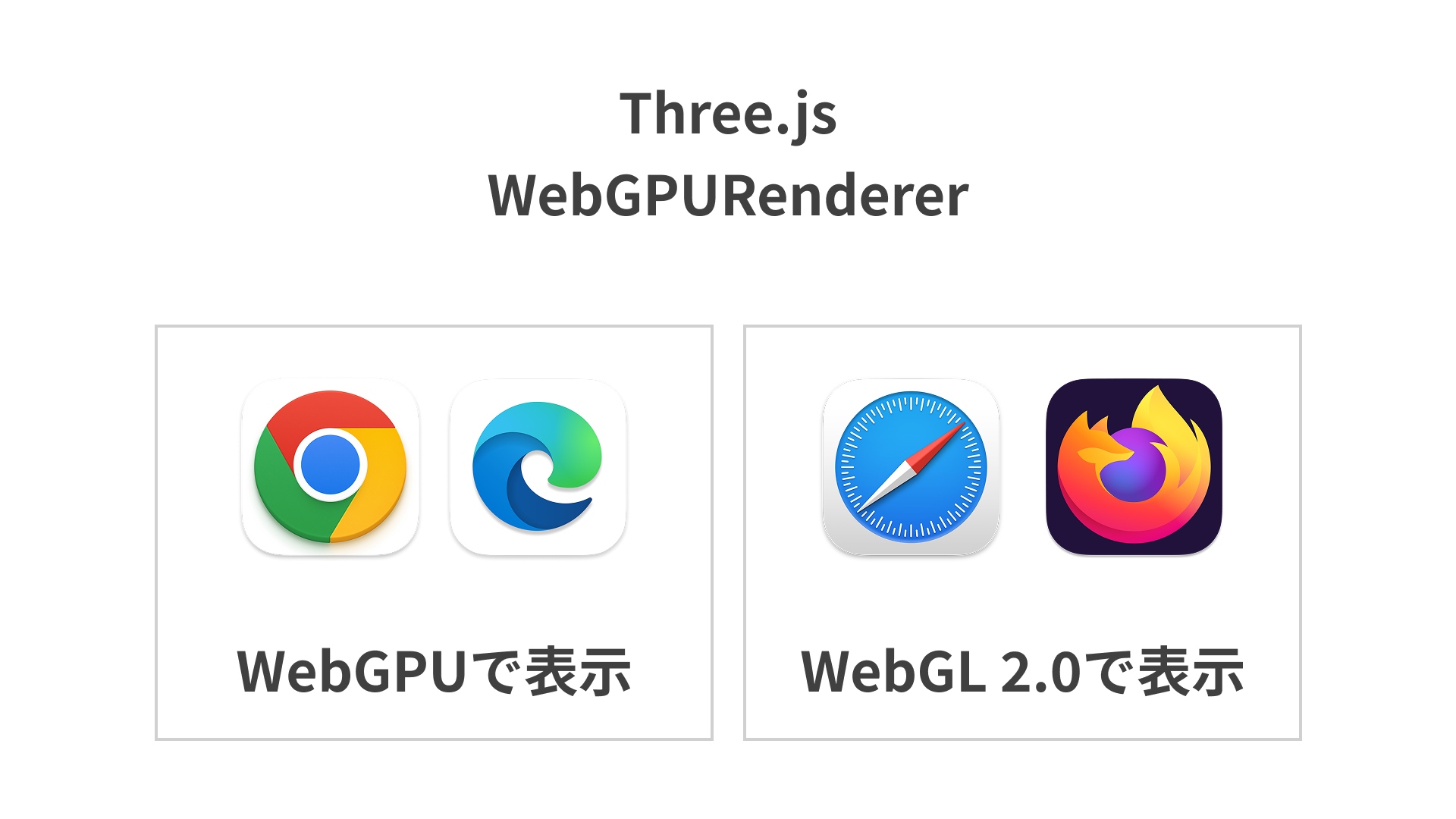
In other words, if you use the new WebGPURenderer, newer environments can benefit from WebGPU, while older environments continue to render with WebGL 2.0.
For now, WebGLRenderer can still be faster
As of Three.js r176 (May 2025), WebGLRenderer can sometimes run faster than WebGPURenderer. To benchmark this, a test was run using a large number of meshes.
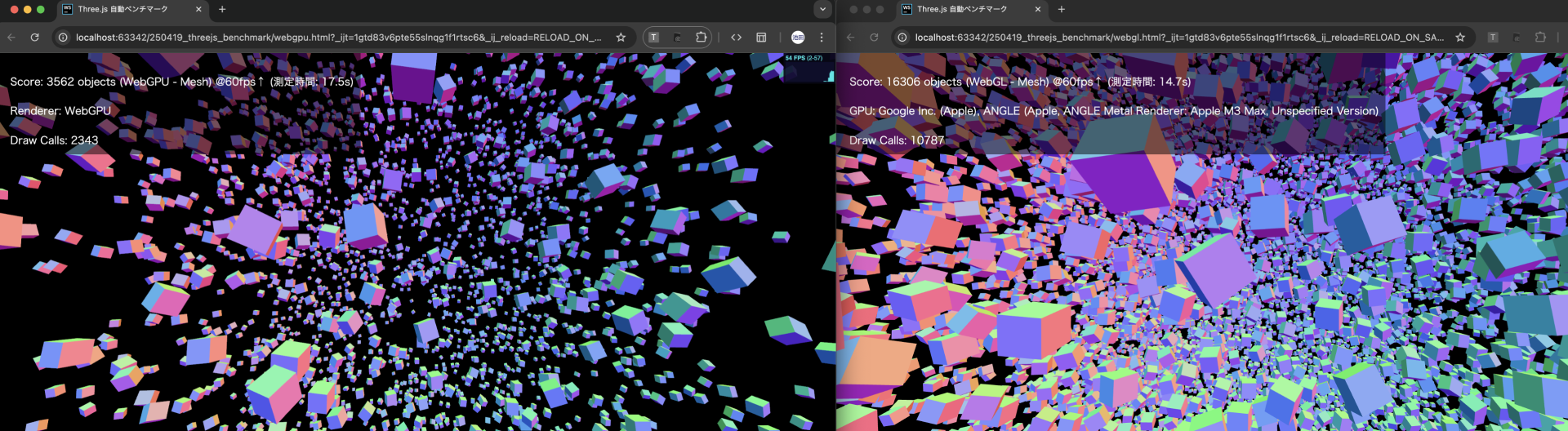
The score was defined as the number of boxes that could be rendered while maintaining 60 FPS. For separate meshes, WebGL performed about four times better.
| Mesh type | Renderer | Number of boxes |
|---|---|---|
| Separate meshes | WebGLRenderer |
2,562 |
| Separate meshes | WebGPURenderer |
682 |
| Instanced meshes | WebGLRenderer |
62,751 |
| Instanced meshes | WebGPURenderer |
31,248 |
Test machine: Windows 10 / Core i5-1135G7 @ 2.40GHz / Intel Iris Xe Graphics / 16 GB memory
In principle, WebGPU should be able to deliver better performance because it uses a newer, more modern API. In the article WebGPU: New graphics and compute possibilities beyond WebGL, tests with native implementations showed higher performance with WebGPU.
At 10,000 draw calls, the WebGL demo drops to about 30 FPS, while the WebGPU demo stays near 50 FPS.
This may be optimistic, but over time the Three.js WebGPU implementation will likely become faster as well.
As of May 2025, the following pull requests were working toward performance improvements.
WebGPURenderer is available in React Three Fiber
As introduced in the article React Three Fiber入門 - ReactとThree.jsで始める3D表現, React Three Fiber lets you use Three.js with JSX syntax, and it can also use WebGPURenderer. For details, see the following documentation.
TSL, GLSL, and WGSL
TSL (Three.js Shading Language) is a new way to define shaders in Three.js.
Traditionally, creating rich visual effects in Three.js required GLSL (OpenGL Shading Language). Native WebGPU uses WGSL (WebGPU Shading Language), but Three.js WebGPURenderer uses TSL instead.
With TSL, shader definitions are written in JavaScript. They are then automatically converted into WGSL for WebGPU and GLSL for WebGL. A single definition can therefore cover both environments, allowing you to develop without worrying about differences between shader languages.
You can explore it in the official webgpu_tsl_editor example.
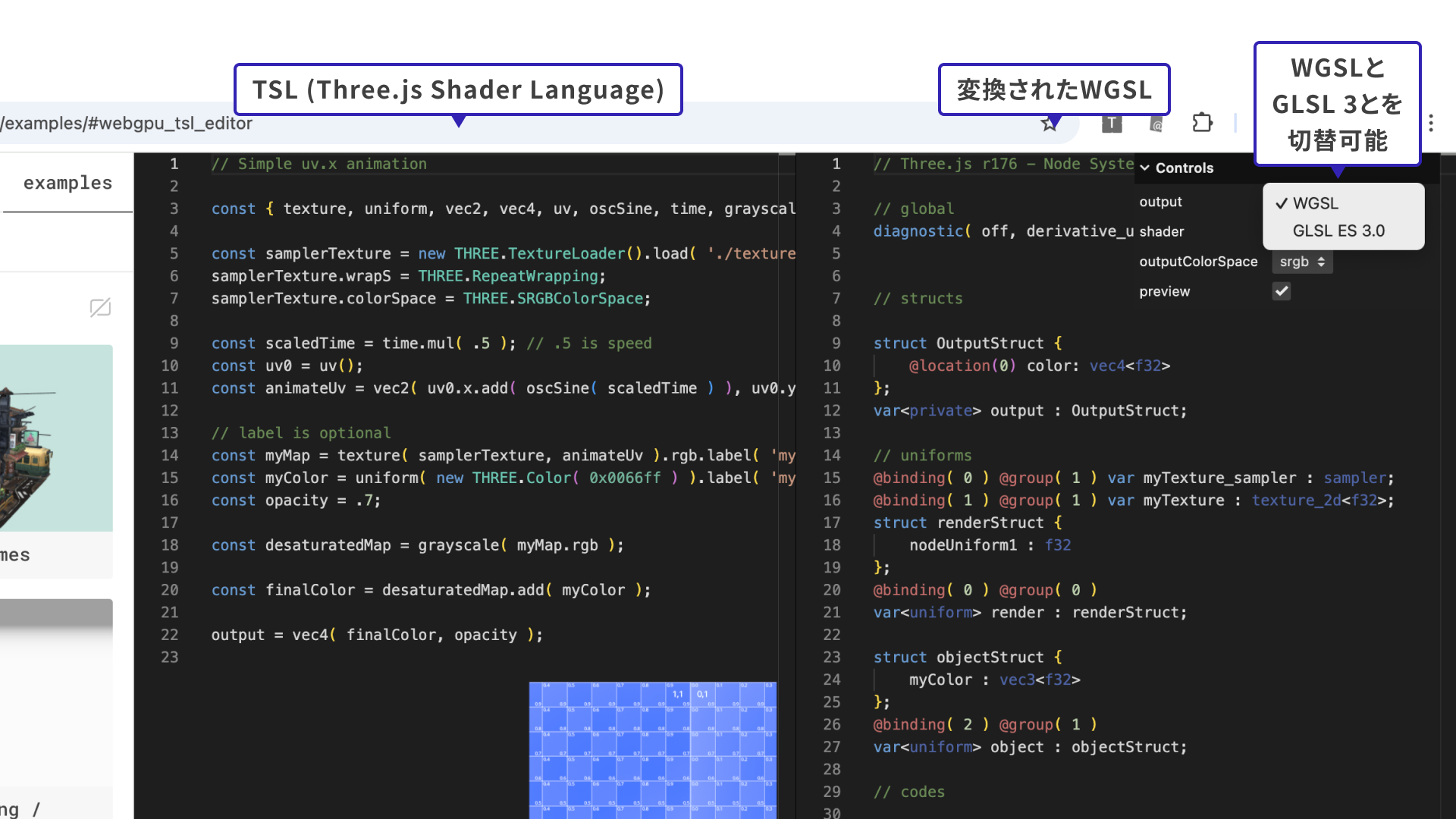
To learn more about TSL, see the following link. One of TSL’s key characteristics is that shader logic is defined in a node-based style.
A simple TSL example
Here is a simple example of TSL code.
The following code creates a basic wave animation that moves vertices over time. It dynamically offsets the vertices with TSL nodes and recalculates the normals to preserve smooth shading.
import { WebGPURenderer, MeshStandardNodeMaterial } from "three/webgpu";
import { positionLocal, normalLocal, sin, time, float } from "three/tsl";

const material = new MeshStandardNodeMaterial();
const wave = sin(positionLocal.x.add(time));
material.positionNode = positionLocal.add(normalLocal.mul(wave).mul(float(5)));
Example of wave deformation on a plane geometry using WebGPURenderer and TSL
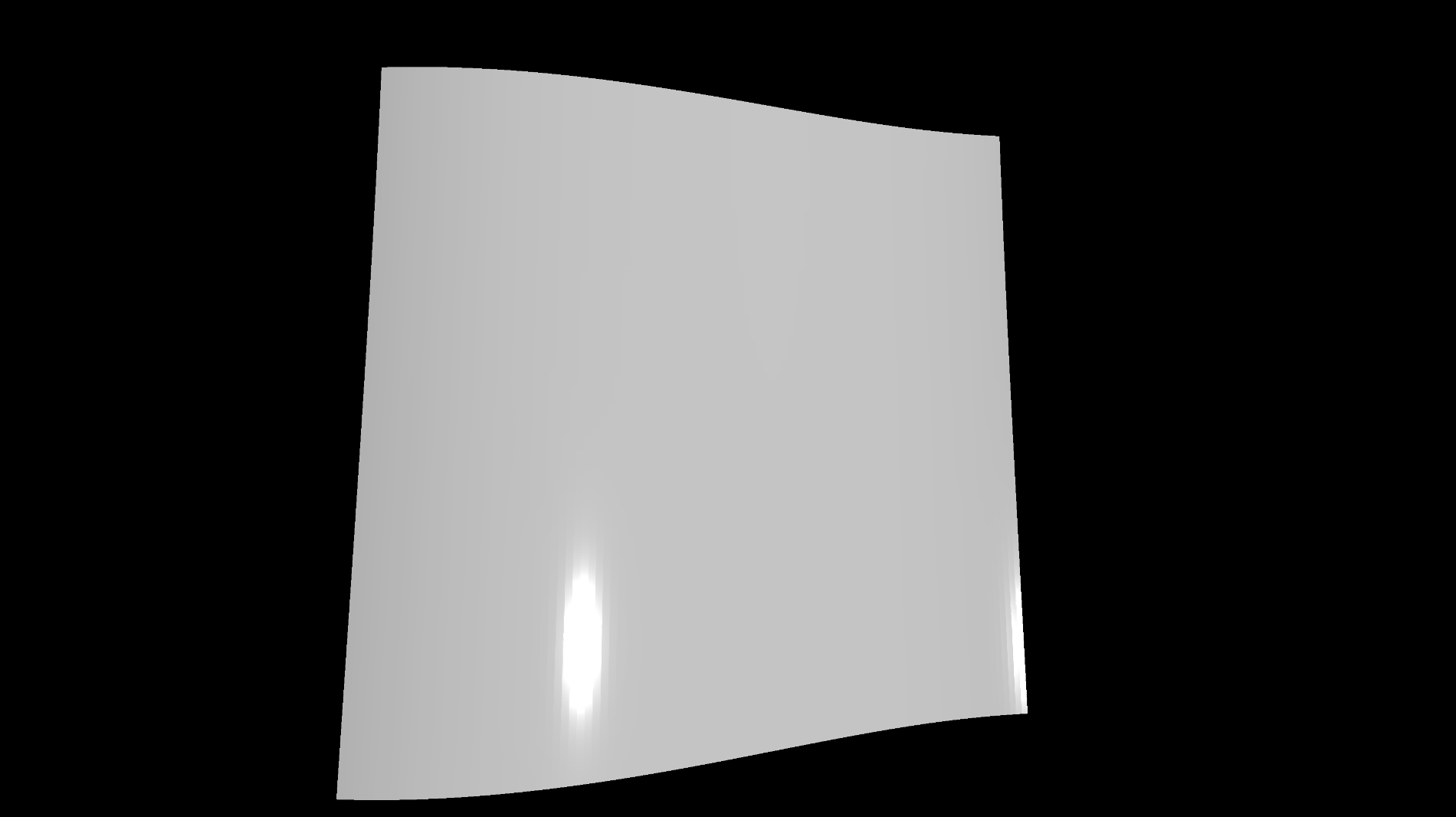
According to Three.js creator mrdoob in the talk Embracing WebGPU and WebXR With Three.js – Mr.doob, JSNation 2024, TSL offers benefits such as tree-shaking during builds and a more intuitive authoring model.
Building a post effect with TSL
A tilt-shift effect was created with TSL. It applies blur to the upper and lower areas based on the Y coordinate, producing an image where the foreground and background appear out of focus.
The official add-ons include various TSL nodes, so interesting effects can be created simply by combining them.
Official demo
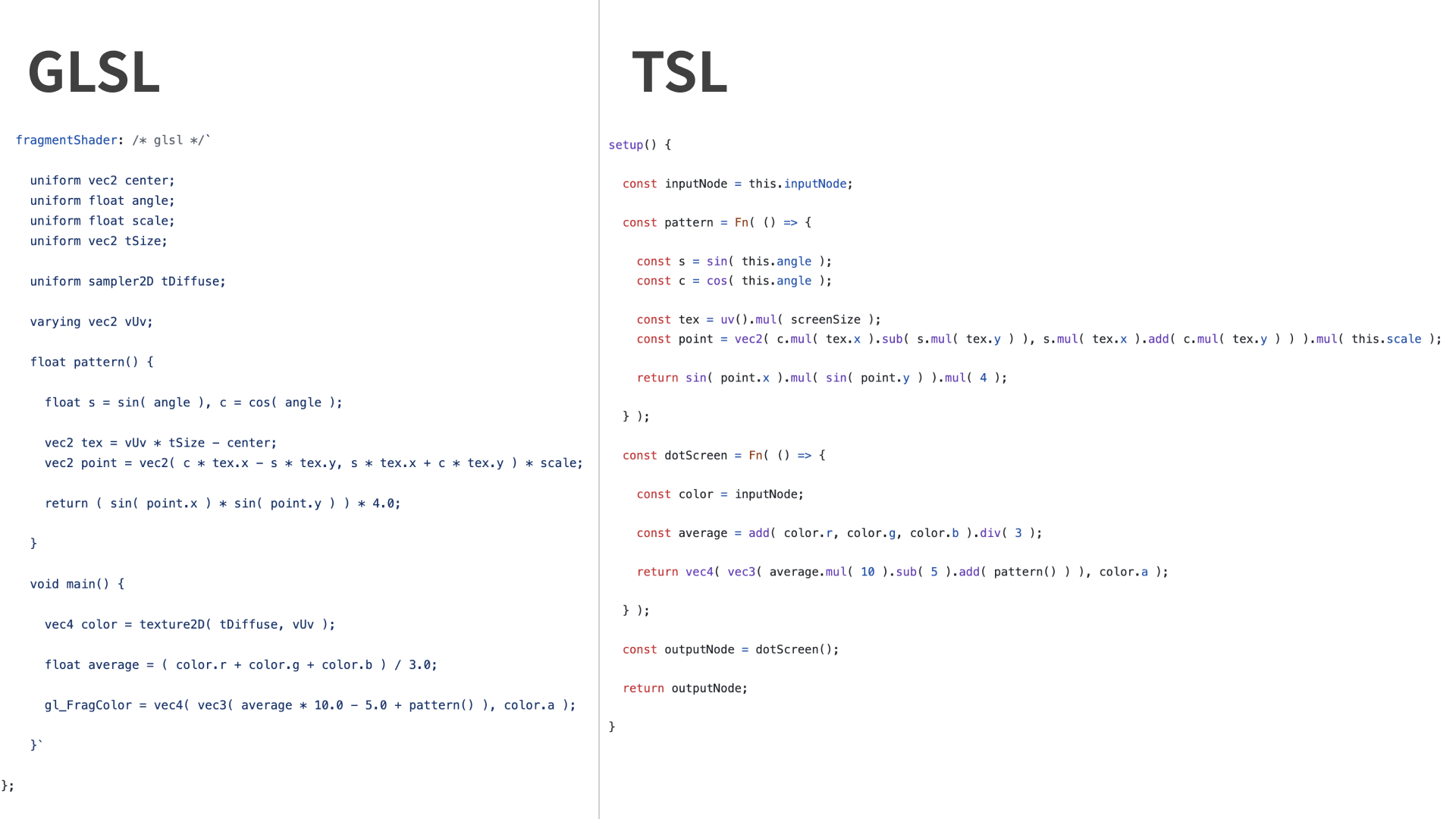
Use the official demos to compare the syntax of GLSL and TSL. The example here uses a dot-screen shader.
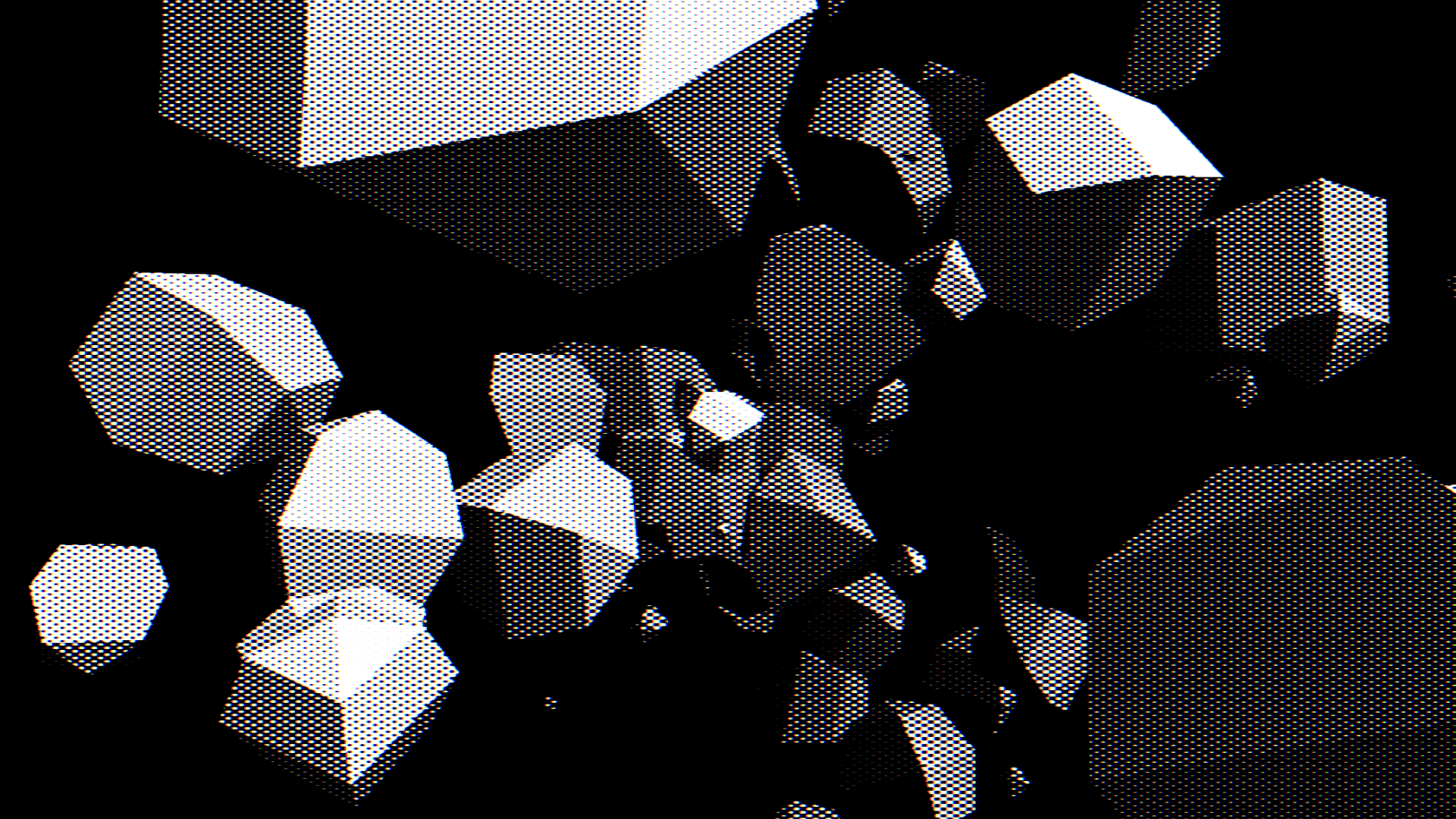
The following image shows selected parts of the relevant code. Although GLSL and TSL (JavaScript) use different syntax, they implement almost the same logic. The shader extracts the luminance of the input image, overlays a grid-like sine-wave pattern, and generates a dot-screen-style result with emphasized contrast.
Column: shader languages and the corresponding technologies
There are three shader languages available on the web: GLSL ES 1.00, GLSL ES 3.00, and WGSL. Their relationship to web graphics technologies is summarized below.
| Technology | Supported shader languages |
|---|---|
| WebGL 1.0 | GLSL ES 1.00 |
| WebGL 2.0 | GLSL ES 1.00 and GLSL ES 3.00 |
| WebGPU | WGSL |
- WebGL 2.0 uses GLSL ES 3.00, but it is also compatible with GLSL ES 1.00.
- If you write shaders in GLSL ES 1.00, they can run in both WebGL 1.0 and WebGL 2.0.
- However, to fully use WebGL 2.0 features, you need GLSL ES 3.00.
- WebGPU cannot use GLSL and requires WGSL.
- TSL is a higher-level language that is automatically converted to WGSL or GLSL ES 3.00.
Conclusion
Development of Three.js WebGPURenderer is moving forward. With the addition of TSL, shader development has also become more intuitive.
That said, browser support is still limited and optimization work is ongoing, so validation is still necessary before using it in production. A good first step is to try it in a small prototype and get a feel for the expressive power and long-term potential of WebGPU.
Keep an eye on future updates and get ready for the WebGPU era.