
The next-generation JavaScript API for web graphics, WebGPU, has been attracting a great deal of attention. ICS MEDIA introduced WebGPU in 2018, but at the time it was still an experimental feature that could only be tried by enabling a developer flag in Safari.
Now that WebGPU can run in the browsers people use every day, this article takes another look at the technology, along with original demos.
What this article covers
- WebGPU became available in Chrome and Edge 113 (May 2023), and Safari 26.0 (September 2025)
- By directly accessing modern 3D APIs, WebGPU can deliver higher performance than WebGL
- WebGPU is fast enough even without draw-call optimization
- WebGPU supports compute shaders, making it applicable to general-purpose computation
- The ecosystem of JavaScript libraries with WebGPU support is also beginning to take shape
What Is WebGPU
WebGPU is a next-generation graphics and compute API for web browsers. Today, WebGL is used in many kinds of web content that rely on 3D graphics or high-performance 2D rendering. WebGPU is a technology that could become WebGL’s successor. It is being standardized by the W3C with the goal of replacing WebGL with something more efficient and more powerful.
WebGPU achieves high performance and efficiency by directly accessing modern 3D APIs that are closer to the GPU’s native capabilities, such as Direct3D 12 on Windows, Metal on macOS and iOS, and Vulkan on Android.
Getting Started with WebGPU
To begin, here is a simple triangle. In 3D graphics, this is the equivalent of a Hello World example. The rendering is displayed in a canvas element using WebGPU. Anyone interested in trying WebGPU should take a look at the source code. The main logic is about 130 lines of JavaScript.

- Open the demo in a new window (view this in an environment where WebGPU is enabled, such as the latest version of Chrome)
- View the source code
Although the API differs from WebGL in several ways, drawing a triangle is still possible with relatively straightforward code. When learning a new concept, it is important to simplify things first and then build up step by step.
Rendering Performance in WebGPU
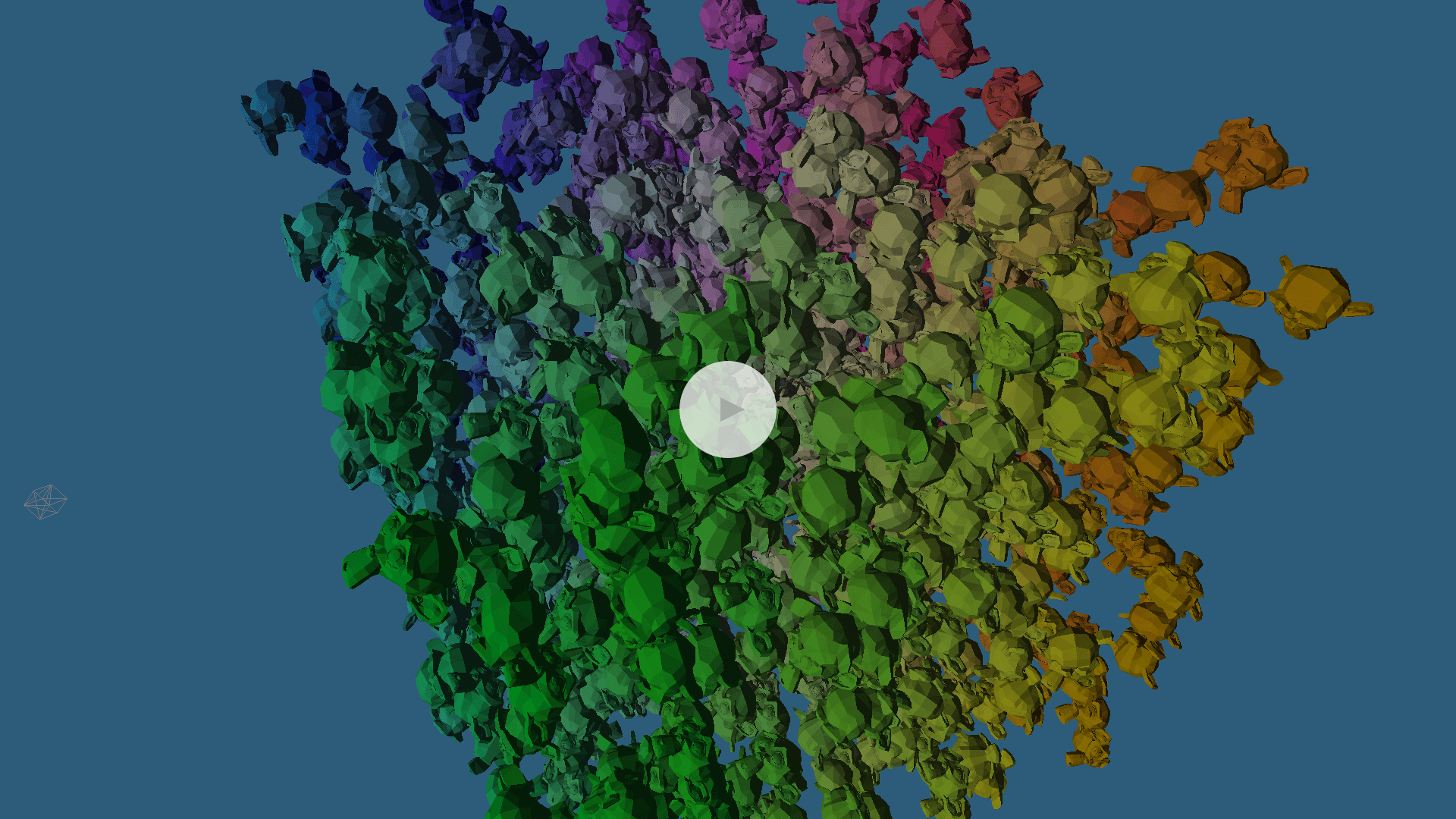
Next, consider WebGPU’s rendering performance. The next demo simulates how performance changes when a large number of objects are placed in a 3D scene.
WebGPU version
- Open the demo in a new window (view this in an environment where WebGPU is enabled, such as the latest version of Chrome)
- View the source code
The demo uses a single 3D model, but each instance is controlled independently with its own parameters, such as rotation. In other words, draw calls are issued once per model.
Anyone who has developed with WebGL probably knows that performance tends to drop when the number of draw calls increases significantly. But if you try the demo, you can see that, depending on your environment, it can still run stably even with thousands of draw calls. In WebGPU, the overhead of issuing draw calls themselves is lower than it is in WebGL.
Comparing WebGL and WebGPU
For comparison, the same demo was also implemented in WebGL. How different is the runtime performance between WebGPU and WebGL?
WebGL version (for comparison)
Use the slider in the upper-right corner to change the number of models being drawn, then compare the frame rate in each demo. The WebGPU version should be able to maintain 60 FPS while drawing more models than the WebGL version.
When both demos were tested with the same number of 3D models, the frame rates were as follows. At 10,000 draw calls, the WebGL demo drops to about 30 FPS, while the WebGPU demo stays near 50 FPS. As the number of models increases, WebGPU consistently delivers better performance.
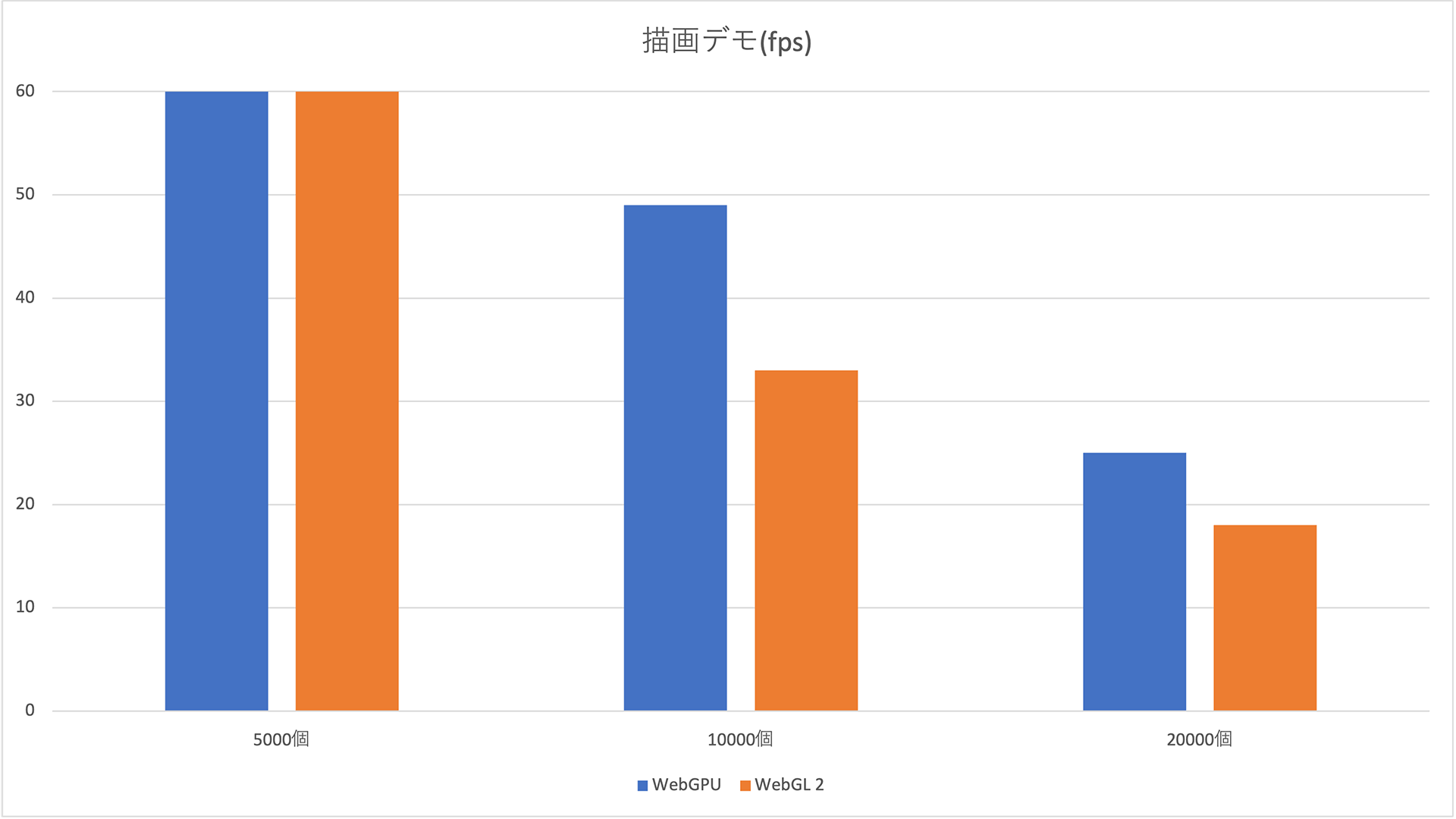
Higher values indicate better performance. Blue represents WebGPU, and orange represents WebGL.
Test environment: Chrome 113.0.5672.53 / macOS 13.3.1 / MacBook Air M1, 2020
Column: Why Does WebGPU Run Faster?
(This column is intended for readers with WebGL development experience.)
In WebGL, issuing a draw call incurred significant CPU overhead because the browser had to validate the various states that had been configured in the WebGLRenderingContext up to that point, such as rendering settings. In WebGPU, by contrast, you create an object called a “pipeline” (specifically, a GPURenderPipeline for rendering) that bundles the states needed for execution in advance. Because state validation happens when the pipeline is created, the overhead at actual draw-call time can be reduced dramatically.
WebGPU also requires separate pipelines to be created ahead of time for each variation of rendering settings. However, switching pipelines is completed with a single API call. In WebGL, the APIs for changing state are split across individual settings, so changing rendering settings per object during a single frame can require many API calls. That is another source of overhead.
In short, a WebGPU pipeline packages all the settings needed to execute rendering or computation, so validation during execution and state switching are both cheaper than in WebGL.
* Actual data such as vertex positions or constants used by shaders are not included in the pipeline. For that kind of data, the pipeline stores only formats and usage, not the values themselves. This keeps validation fast while still allowing the actual data to change flexibly. For example, when the shader and rendering settings are identical, one pipeline can be reused to draw multiple models by switching only the vertex buffers and textures.
* In WebGL, if you need to render a large number of identical objects at once, using geometry instancing can significantly improve performance by reducing the number of draw calls. In this demo, that optimization was intentionally not used so that the draw-call overhead would be easier to observe. The code simply issues draw calls one by one. Of course, geometry instancing is also available in WebGPU.
Compute Shaders: A Major New Capability in WebGPU
Compared with WebGL, one of the biggest new capabilities available in WebGPU is the compute shader. Compute shaders are used for GPGPU (general-purpose computing on GPUs), and they make it possible to perform numerical calculations at high speed by taking advantage of the GPU’s computational power.
If you look back at the major trends in computing over the last few years, GPUs have become central in AI. Demand for graphics boards also surged because of cryptocurrency mining, sometimes leading to stock shortages. That gives a sense of how familiar GPGPU has already become. Of course, compute shaders can also be used to calculate object positions and state for 3D rendering.
Compute Shader Demo
The following demo uses WebGPU compute shaders to perform a bitonic sort. It generates an array of random elements and compares the execution time of sorting on the CPU with JavaScript’s built-in sort() function against sorting on the GPU with a compute shader.
Try the demo below. When the number of elements is small, the CPU finishes faster. But as the number of elements increases, the situation reverses, and GPU execution becomes dramatically faster than CPU execution.

- Open the demo in a new window (view this in an environment where WebGPU is enabled, such as the latest version of Chrome)
- View the source code
Bitonic sort is a sorting algorithm well suited to parallel computation. GPUs excel at parallel workloads, so using compute shaders enables the sort to run efficiently.
* Bitonic sort can only be applied when the number of elements is a power of two, so in some cases you need to add dummy data.
Comparing CPU and WebGPU Execution Time
The sorting times for the CPU and GPU were as follows for each element count. On the graph, WebGPU (the blue line) is slightly above the CPU (the green line) at 4,096 elements and below, meaning it takes a bit longer. But as the element count increases, the relationship reverses and the gap widens substantially. CPU execution time appears to grow exponentially, while WebGPU remains under 30 milliseconds and increases only linearly.
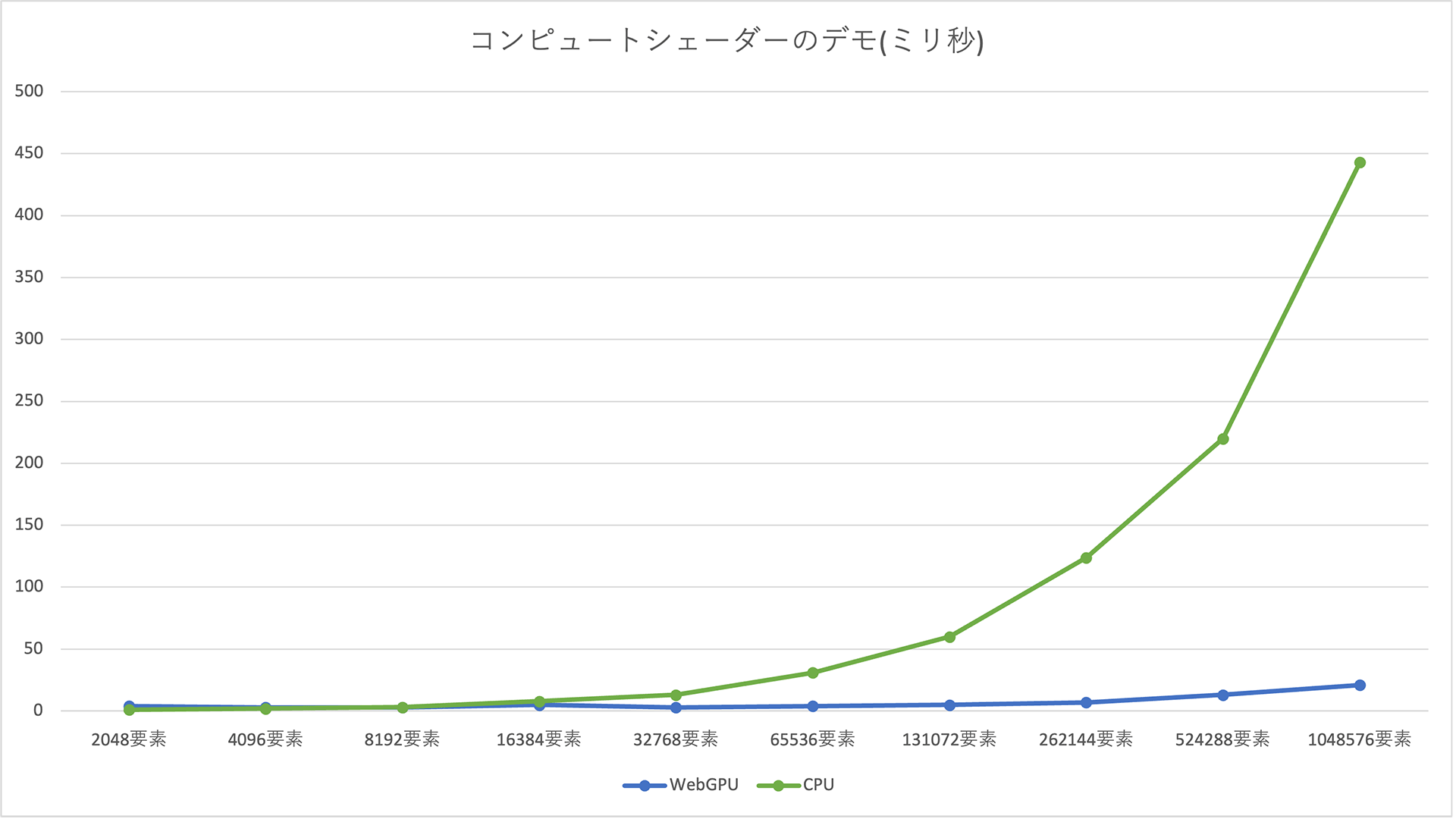
Lower values indicate better performance. Blue represents WebGPU, and green represents the CPU.
Test environment: Chrome 113.0.5672.53 / macOS 13.3.1 / MacBook Air M1, 2020
Column: Why Is the CPU Faster When the Number of Elements Is Small?
The measured GPU sorting time includes the time needed to transfer data to the GPU and then back to the CPU after the sort is complete. When the element count is small, that transfer time and the overhead of issuing commands to the GPU make GPU execution slower than CPU execution. Once the element count becomes large enough, the GPU’s computational power more than makes up for the overhead, and the performance reverses.
This shows that compute shaders can dramatically accelerate parallel computation over large data sets.
The Current State of WebGPU Implementations
As of 2025, Chrome’s WebGPU implementation supports most of the API specification. The kinds of visuals possible in WebGL, including WebGL 2, can be reproduced using WebGPU’s new API.
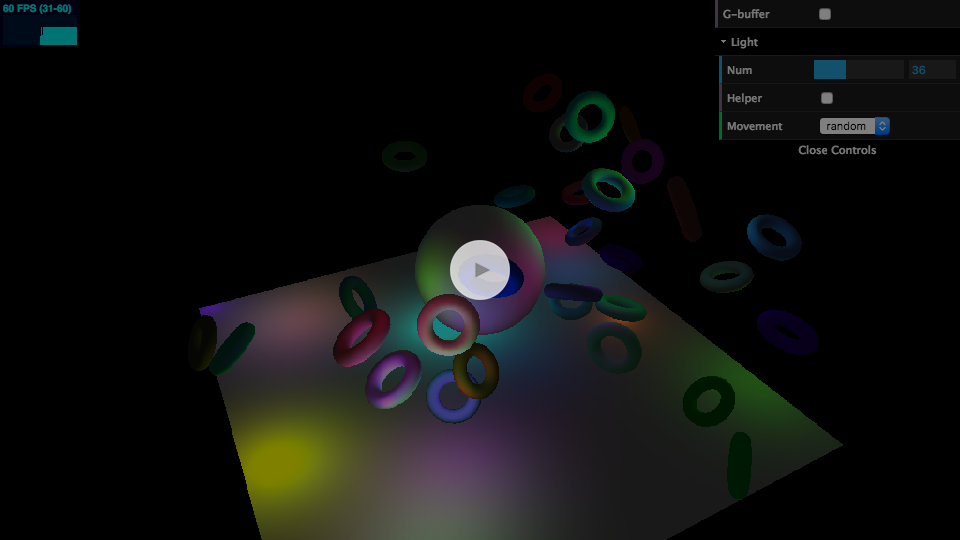
As an example, a demo previously introduced on ICS MEDIA that used WebGL 2’s MRT (Multiple Render Targets) feature was reimplemented for WebGPU. It uses a technique called deferred rendering to place many lights in a 3D scene and produce the lighting.
- Open the demo in a new window (view this in an environment where WebGPU is enabled, such as the latest version of Chrome)
- View the source code
This is just one example, but it shows that WebGPU provides an API capable of reproducing the same kinds of visual expression as WebGL.
WebGPU Support by Browser
Implementation has also progressed in browsers other than Chrome. Here is the state of support in the major browsers as of 2025.
Chrome
- Available by default since Chrome 113.
- Not available on Linux.
Edge
- Available by default since Edge 113.
Safari / Safari on iOS
- Available since Safari 26.0, released in September 2025.
- Previously, enabling the “WebMetal” flag allowed the older WebGPU API to be used. That flag has now been removed.
Firefox
- WebGPU is available starting with Firefox 141, released in July 2025.
- Windows only.
Chrome for Android
- Available by default since Chrome 121.
Reference: Can I use…
WebGPU Support in Libraries
The demos in this article were implemented from scratch without using libraries, relying only on the native JavaScript API and the WGSL shading language. Most people build content with libraries, so the state of library support is naturally important.
WebGPU is already available in the following major 3D libraries originally built for WebGL.
- Three.js: available as an experimental feature
- Babylon.js: broadly supported and ready to use aside from a few features (details)
For more on using WebGPU in Three.js, see ICS MEDIA’s article Three.jsのWebGPURendererの使い方.

A WebGPU sample running in Three.js. Work on WebGPU support is also progressing across libraries.
In PixiJS, a 2D rendering library, WebGPU has been supported since v8, released in March 2024. And although it is not a rendering library, TensorFlow.js, which allows machine learning to run in JavaScript, also offers an option to use WebGPU as a backend for faster execution.
These libraries are likely to benefit many users, and ICS MEDIA plans to cover them in future articles as well. Keep an eye on upcoming updates.
Conclusion
WebGL is specified by the Khronos Group, while WebGPU is being standardized by the W3C. As of April 2025, WebGPU was still at the Candidate Recommendation Draft stage in the W3C recommendation process, so it may still take time before it becomes a full Recommendation.
Even in browsers other than Chrome and Edge, you can already try the feature by using developer builds or enabling flags. Submitting feedback and bug reports will also help the standardization of WebGPU. Try WebGPU for yourself.