# Getting started with GSAP, part 3: ScrollTrigger, MotionPath, FLIP, and text animation
Author: IKEDA Yasunobu
Published: 2026-03-18 / Updated: 2026-08-14
Part 3 of this introduction to [GSAP](https://gsap.com/) introduces its powerful plugins.
### Scroll control
To control animations in sync with scrolling, use the GSAP plugin [ScrollTrigger](https://gsap.com/docs/v3/Plugins/ScrollTrigger). ScrollTrigger is one of GSAP's flagship features and is frequently used on creative websites.
In the following sample, try scrolling downward. As the paragraphs enter the viewport, they appear in a flowing sequence.
- [Open the demo in a new window](https://ics-creative.github.io/220822_gsap_examples/scrollTrigger/example_2.html)
- [View the source code](https://github.com/ics-creative/220822_gsap_examples/blob/main/docs/scrollTrigger/example_2.html)
With ScrollTrigger, you can easily create effects such as playing an animation when an element enters the viewport.
For simple viewport-entry handling, you might use the [Intersection Observer API](https://ics.media/entry/190902/).
ScrollTrigger supports more complex control.
What ScrollTrigger can do:
- Specify trigger timing
- Specify retriggering rules (for example, whether it should play again after it has already played)
- Specify whether elements should be pinned during scrolling
- Link animation progress to scroll position (scrubbing)
#### How to use ScrollTrigger
A simple implementation example is as follows.
If you load it with a `script` tag, import the plugin from a CDN.
```html
```
If you use npm, please refer to [GreenSock | Docs | Installation](https://gsap.com/docs/v3/Installation?checked=core,requireSyntax#esModules).
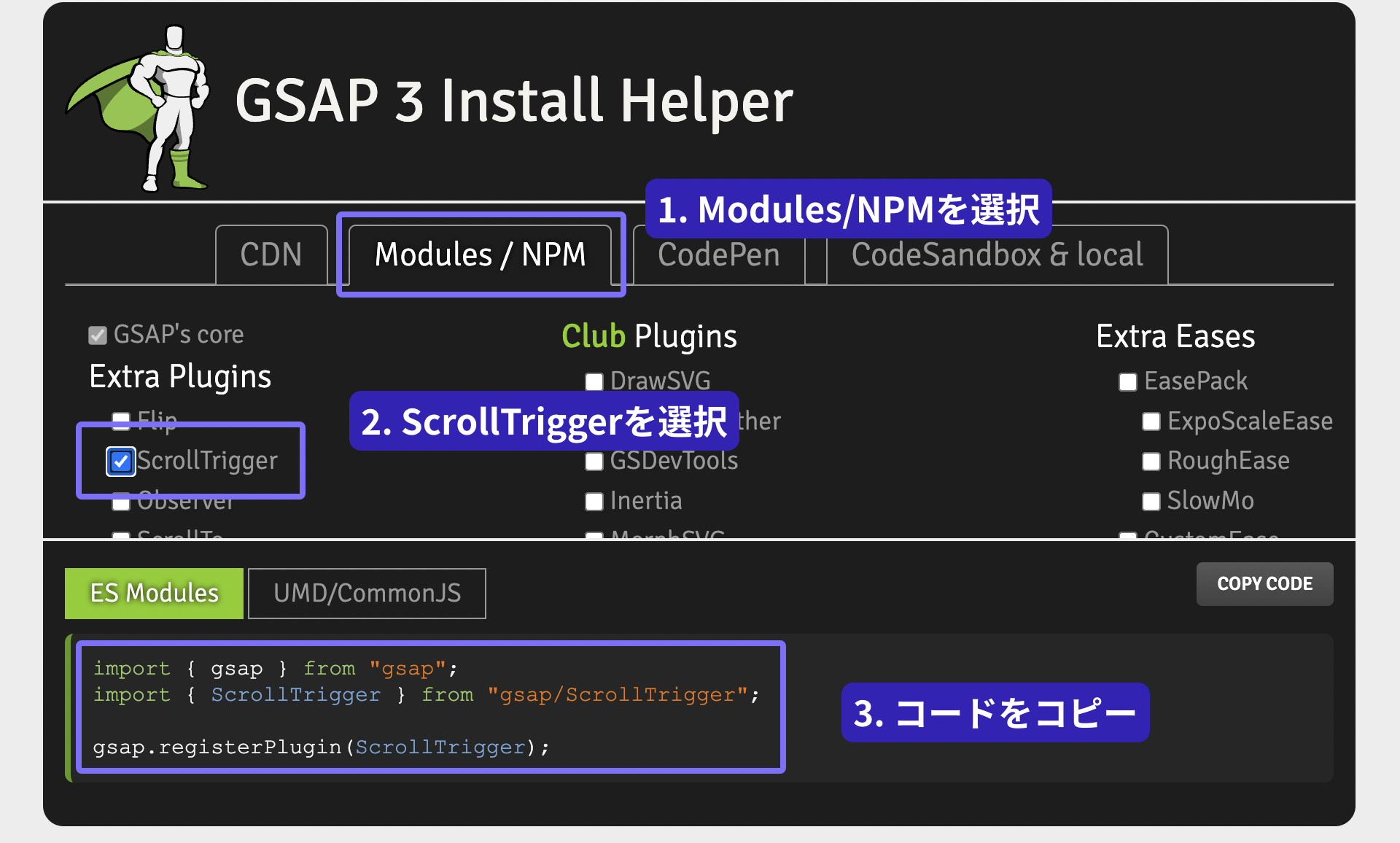
In JavaScript, register the plugin with the `gsap.registerPlugin()` method. Plugin registration only needs to happen once when JavaScript runs, so avoid calling `gsap.registerPlugin()` repeatedly.
```js
// register the plugin
gsap.registerPlugin(ScrollTrigger);
```
Where you want to use it, specify the `scrollTrigger` property.
```js
// get the elements to animate
gsap.utils.toArray("section").forEach((el) => {
gsap.from(el, {
x: 128,
opacity: 0,
duration: 1.5,
ease: "power4.out",
// ScrollTrigger settings
scrollTrigger: {
trigger: el, // target
},
});
});
```
The result is as follows (the effect is simpler than the demo above and the code is shorter).
- [Open the demo in a new window](https://ics-creative.github.io/220822_gsap_examples/scrollTrigger/example_1.html)
- [View the source code](https://github.com/ics-creative/220822_gsap_examples/blob/main/docs/scrollTrigger/example_1.html)
For a detailed explanation of ScrollTrigger, please refer to our article [トレンドウェブサイトから学べ! JavaScriptで作る本格スクロール演出](https://ics.media/entry/210426/).
#### Note: How is it different from CSS Scroll-driven Animations?
Chrome, Edge, and Safari support a feature called "Scroll-driven Animations."
- [CSSだけでスクロールアニメーションが作れる!? 新技術Scroll-driven Animationsとは](https://ics.media/entry/230718/)
Scroll-driven Animations lets you create scroll animations with CSS alone, without using a JavaScript library. ScrollTrigger differs in that it lets you combine and control features such as pinning, snapping, and callbacks with JavaScript.
### Move along a curve
For tweens that follow a curve, use the GSAP plugin [MotionPathPlugin](https://gsap.com/docs/v3/Plugins/MotionPathPlugin).
It allows an element to move along an SVG path. A key highlight is that the dot rotates as it follows the path.
```js
// register the plugin
gsap.registerPlugin(MotionPathPlugin);
gsap.to("#rect", {
duration: 3,
ease: "power4.inOut",
// specify the path
motionPath: {
// move along the SVG path
path: "#path",
align: "#path",
autoRotate: true,
alignOrigin: [0.5, 0.5],
},
});
```
- [Open the demo in a new window](https://ics-creative.github.io/220822_gsap_examples/motionpath.html)
- [View the source code](https://github.com/ics-creative/220822_gsap_examples/blob/main/docs/motionpath.html)
You can also create curved tweens for arbitrary parameters. Personally, I use MotionPathPlugin more for this purpose than for the SVG-path use case introduced above. The key point is that you can apply curves not only to XY coordinates but also to various other properties.
```js
// register the plugin
gsap.registerPlugin(MotionPathPlugin);
// (excerpt)
// move them all together
const list = gsap.utils.toArray(".rect");
list.forEach((rect, index) => {
gsap.fromTo(
rect,
{
x: "-40vw",
scale: 0.0,
},
{
duration: 2 + Math.random() * 3,
repeat: -1,
ease: "power1.inOut",
x: "40vw",
motionPath: [
{ y: (Math.random() - 0.5) * 20 + "vh", scale: 1 },
{ y: (Math.random() - 0.5) * 50 + "vh", scale: 0 },
],
delay: Math.random(),
},
);
});
```
- [Open the demo in a new window](https://ics-creative.github.io/220822_gsap_examples/motionpath_bezier.html)
- [View the source code](https://github.com/ics-creative/220822_gsap_examples/blob/main/docs/motionpath_bezier.html)
### How to install MotionPathPlugin
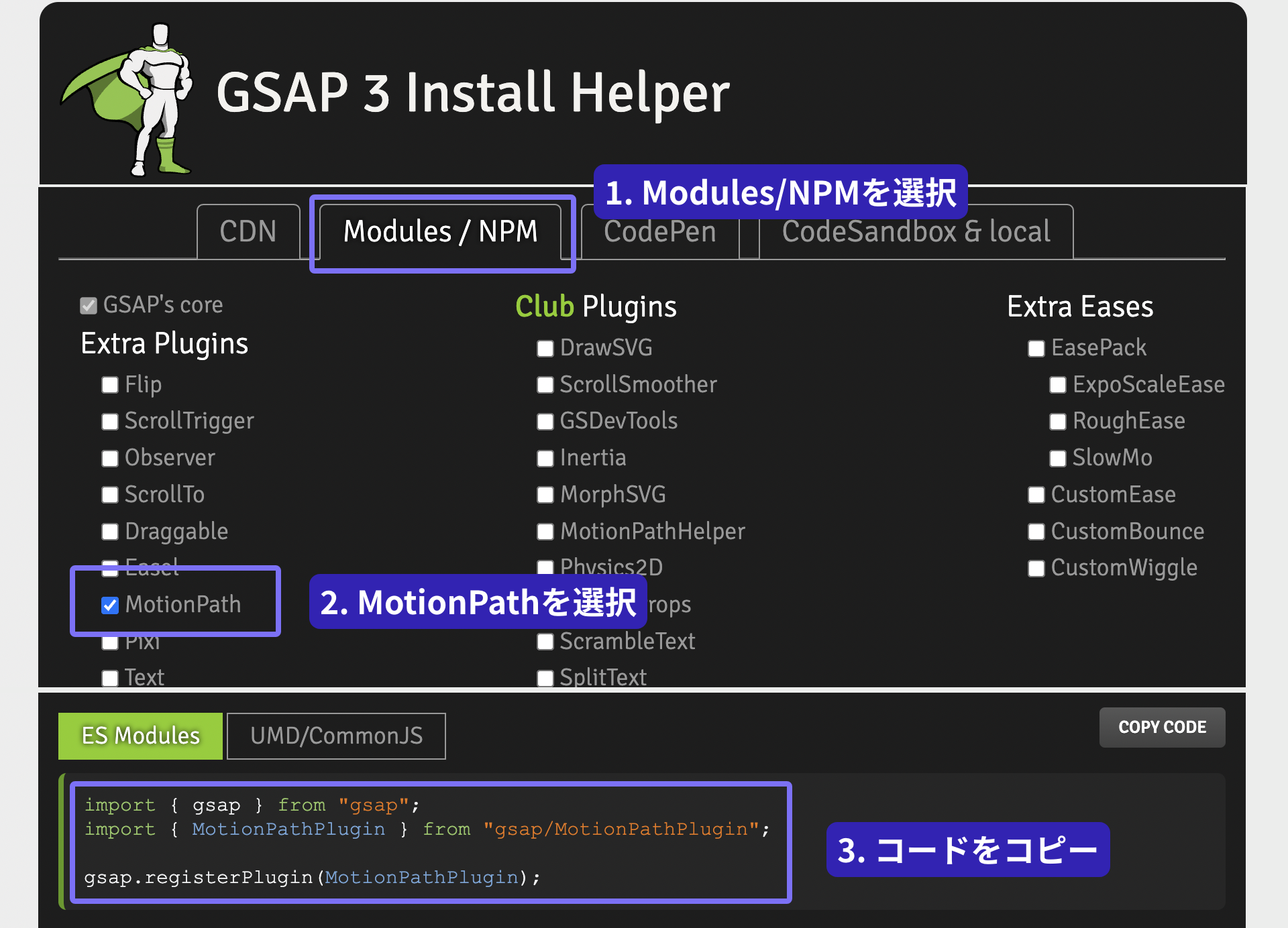
MotionPath requires plugin registration. If you use a CDN, write it as follows.
```html
```
If you use npm, it is included in GSAP itself, but pay attention to the ES Modules `import` statement. It is helpful to refer to [Install Helper](https://gsap.com/docs/v3/Installation?checked=core,motionPath,requireSyntax#modules).
### FLIP plugin
FLIP stands for First, Last, Invert, and Play. It is a technique for smoothly connecting the states before and after a layout change. GSAP's [Flip plugin](https://gsap.com/docs/v3/Plugins/Flip/) records positions and dimensions with `Flip.getState()`. After changing the DOM or CSS, call `Flip.from()` to animate from the recorded state to the current one.
- [Open the demo in a new window](https://ics-creative.github.io/260123_flip_layout/gsap.html)
- [View the source code](https://github.com/ics-creative/260123_flip_layout/blob/main/gsap.html)
For details, please refer to the article [JavaScriptで実現するFLIPアニメーションの原理と基礎](https://ics.media/entry/240902/).
### Text animation
GSAP also provides plugins designed specifically for text animation. Here are three of them.
*Some of these plugins previously required a paid license, but they are now available for free with GSAP.*
#### Reveal text one character at a time with TextPlugin
[TextPlugin](https://gsap.com/docs/v3/Plugins/TextPlugin/) gradually replaces the text in a DOM element. When applied to an empty element, it can display text as if it were being typed one character at a time.
```js
gsap.registerPlugin(TextPlugin);
gsap.to(".demo", {
duration: 1,
text: "Text appears one character at a time",
ease: "none",
});
```
- [Open the demo in a new window](https://ics-creative.github.io/220822_gsap_examples/text_textplugin.html)
- [View the source code](https://github.com/ics-creative/220822_gsap_examples/blob/main/docs/text_textplugin.html)
#### Animate by character and line with SplitText
[SplitText](https://gsap.com/docs/v3/Plugins/SplitText/) breaks text into characters, words, or lines. In the following example, each character is masked, and `yPercent` and `stagger` reveal the characters from left to right.
```js
gsap.registerPlugin(SplitText);
const split = SplitText.create(".demo", {
mask: "chars",
});
gsap.from(split.chars, {
yPercent: 100,
duration: 0.75,
ease: "power4.out",
stagger: 0.04,
});
```
- [Open the demo in a new window](https://ics-creative.github.io/220822_gsap_examples/text_splittext.html)
- [View the source code](https://github.com/ics-creative/220822_gsap_examples/blob/main/docs/text_splittext.html)
For line-based animation, specify `type: "lines"` and `mask: "lines"`, and animate `split.lines`.
```js
const split = SplitText.create(".demo", {
type: "lines",
mask: "lines",
});
gsap.from(split.lines, {
yPercent: 100,
duration: 1,
ease: "power4.out",
stagger: 0.2,
});
```
- [Open the demo in a new window](https://ics-creative.github.io/220822_gsap_examples/text_splittext_lines.html)
- [View the source code](https://github.com/ics-creative/220822_gsap_examples/blob/main/docs/text_splittext_lines.html)
#### Combining SplitText with ScrollTrigger
SplitText can also be combined with ScrollTrigger. In the following example, each block animates by character when it enters the viewport.
- [Open the demo in a new window](https://ics-creative.github.io/220822_gsap_examples/text_splittext_scrolltrigger.html)
- [View the source code](https://github.com/ics-creative/220822_gsap_examples/blob/main/docs/text_splittext_scrolltrigger.html)
#### Scramble text with ScrambleTextPlugin
[ScrambleTextPlugin](https://gsap.com/docs/v3/Plugins/ScrambleTextPlugin/) gradually reveals the intended text from random characters. With `scrambleText: "{original}"`, the animation resolves to the element's original text.
```js
gsap.registerPlugin(ScrambleTextPlugin);
gsap.to(".demo", {
duration: 1,
scrambleText: "{original}",
});
```
- [Open the demo in a new window](https://ics-creative.github.io/220822_gsap_examples/text_scrambletext.html)
- [View the source code](https://github.com/ics-creative/220822_gsap_examples/blob/main/docs/text_scrambletext.html)
### Conclusion
GSAP plugins are compelling because they make it possible to create eye-catching effects with only a small amount of code. I also find it interesting that using plugins can inspire new ideas for animation.
Next, [Part 4](https://ics.media/en/entry/220827/) covers advanced tween control, utility functions, and more.